Transmit Gets S3 Support
Transmit, my favorite FTP client for OS X, can now connect to Amazon S3 accounts. I never saw this coming but it only makes sense with more and more people using the affordable S3 as a static file host and personal file server. This quite literally makes my day, thank you Cabel and crew.
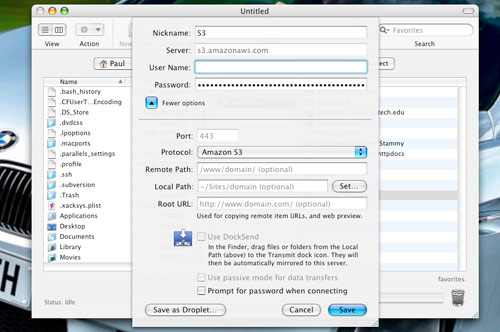
The only issue I can find with Transmit’s S3 support is opening a bucket with a ton of files in it - such as one’s Bandwagon bucket. Transmit just seems to hang. Another new inclusion in version 3.6, a free upgrade for all registered Transmit 3 owners, is remote URL field in favorites:
Copy an uploaded item’s URL to the clipboard, and preview an item in a web browser.
Sounds handy.
I’m all up for making it easier to use Amazon S3 and now that it is supported in Transmit, where I spend most of my time FTP’d into personal and client servers editing files with TextMate, my workflow won’t be interrupted should I need to check something on my S3 account. That and my previous method of S3 transfers was carried out with S3fox, a Firefox extension. Given Firefox’s stability, I never felt comfortable uploading or downloading gigabytes through it.
As long as I’m praising Amazon S3 for the 42nd time, I might as well point you to older S3 praise pieces:
Why I Started Using Amazon S3
How To: Be a Tech Consultant for Small Businesses
On Being a Website Performance Junkie
How To: Optimize Your Site with Image Sprites
How To: Bulletproof Server Backups with Amazon S3


Sounds cool yeh but JungleDisk is quite good as well.
What’s really missing is a web interface for remote access
of course, I meant apart from the unusable S3Browse and S3Interface
Sounds like enough to get me to switch from CyberDuck. Thanks for the heads-up.
This is a great new feature. I always felt Mac needed better S3 uploading tools.
Sweet!! Now I can stop using ForkLift for S3.
I agree, Jungledisk is a great tool (too bad you can’t create buckets with it though). I also use S3 Organizer (A Firefox plugin) https://addons.mozilla.org/en-US/firefox/addon/3247 It is dead simple to use.
I think the time may have come to go the S3 route now :-)
I’m a big Transmit fan as well - nice, user-friendly interface. I would like to see it offer a way to build profiles to access different Web sites more easily.
Actually, this new Transmit feature comes just as I have binned it. I loved this application, but it became totally redundant for me after the arrival of Forklift. This has to be the best application I have seen this year. It completely replaces no less than three applications that I previously used daily: PathFinder (which had been getting a bit top-heavy recently); Transmit (the FTP in Forklift supports SFTP, like Transmit, but is actually much more intuitive and easy to use); and AppZapper (you can delete applications safely from inside the panel).
Forklift supports S3 as well (I suspect this may have something to do with Transmit offering the feature). But to be honest, I can’t see the point of accessing S3 buckets via a third-party interface. S3 works best with tailor-made clients such as JungleDisk, which allows me to access S3 via the Finder, as if my files were on my desktop.
indeed, by combining Jungledisk and Forklift, I can actually totally dispense with Transmit and/or direct S3 access, and move files seamlessly from and to any combination of media, whether any of the computers on my home network, my extrenal hard drives, S3 and my Media Temple (gs) and (dv) accounts. All within one two-column interface witha click of a mouse or a drag-and drop.
I currently use captain ftp as the sync option is really good for iWeb. When using transmit sync option, can you get it to ignore the date and just compare files like cap ftp?
Is transmit faster than cyberduck by any chance, uploads seem to take atleast 5 seconds longer than they do with smartFTP on my parents windows laptop.
Yeah, good to see Transmit is catching up on the S3 front. A little late though - I’ve already bought Forklift in June for handling my S3 storage, and that software’s been doing me some real good since than. It does a lot more than just ftp/sftp/s3 handling, and it seems to be a lot faster than Transmit.
So, this release is not going to get Transmit back on my dock.
I’m happy to say that this was finally the feature that made me part with my hard-earned cash and buy Transmit.
anyone know what to put in the “Remote Path” when using an ftp client like Transmit? “/” did not work for me.