Review: Yahoo! YSlow for Firebug
Up until now there had been only a few tools to help web developers assess the speed and optimization status of their websites. Primarily, there is the Net tool of the ever-popular Firebug add-on for Firefox. The Net tool can tell you what a website is loading, how long it takes, if it’s cached, headers and similar items. Yesterday, Yahoo! released their own add-on to Firebug called YSlow.
YSlow rates your website or any website at all for that matter based on Yahoo!’s own rules for high performance websites. The rules aren’t for the faint of heart and envelop 13 rules including commonly overlooked ones such as Expires headers, Content Delivery Networks, and ETags. This is where my criticism for YSlow comes into play. I think YSlow should have a setting for different levels or types of websites to test. Perhaps one level for blogs, one level for corporate websites, another level for mission critical e-commerce sites and similar.
For example, I don’t think one can honestly dock points from a blog with less than 20k pageviews/month for not using a pricey CDN. Also, the weight of different rules seems to be off. The benefits of a CDN or ETags aren’t on the same level as the benefits of say, gzipping all CSS, JS and XHTML. My point being that YSlow’s grading algorithm is rigorous, with Yahoo!’s own YSlow download page earning a D/61 score.
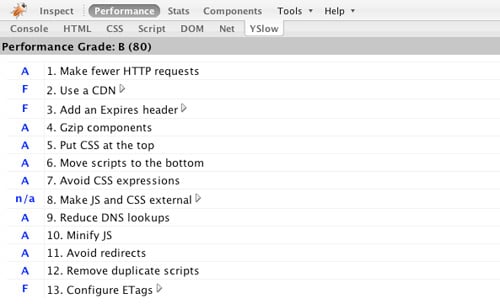
However, with YSlow being released by the Yahoo! Developer Network, it is quite possible they only intended YSlow to be utilized by upper-echelon developers for global corporations with extremely high-trafficked websites. Nonetheless, YSlow is very handy, seamlessly adding onto Firebug.
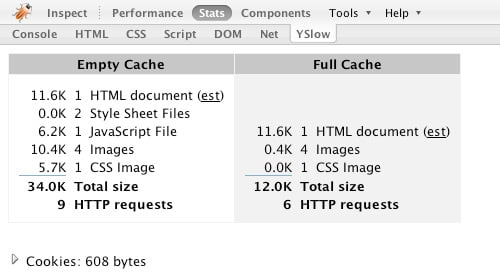
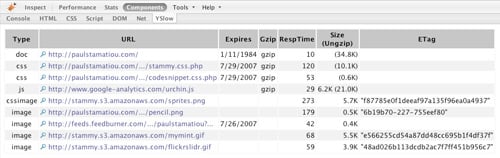
Clicking on any of the arrows or magnifying glass icons within YSlow displays more information about the corresponding high performance rule and how it applies to the current site, or displays the headers for a particular website component, respectively.
What are your thoughts on the Firebug YSlow add-on? As a sidenote, I think it’s great that Yahoo! is working on a Firefox product and releasing their work to the community.


Yeah I saw this and checked it out recently, and agree with you that there’s no way my site will need many of those fancy features. However, it’s nice to know that they exist (because I didn’t beforehand!), and are probably worth looking into to broaden my knowledge on the topic.
It’s a pretty handy tool; I grabbed it yesterday and tested it on my site. Like you said, a lot of the recommendations it makes go above and beyond what most folks would need for their site. However, it’s a super handy tool none the less. I was under the impression that WP-Cache2 was doing gzip for me, but the tool identified that it wasn’t and I put together a fix. Good stuff.
This wouldn’t be about to become your next ‘venture’ by any chance, a set of optimization tools for different levels and type of site could be pretty handy!
It is a shame that our sites have no way of getting an A right out of the box (but I understand you can actually define your own rules). But on the bright side, this basically provides a checklist for the things you should do as you grow to keep page views snappy.
Looks like a very useful tool, I never really used firebug that much before but I think I have to reinstall it now
I checked out YSlow yesterday on my site. There were a bunch of things I already knew about site performance tuning, but once I stumbled upon ETags and CDN I Didn’t know what to think. So I started reading up on both topics non-stop. I found a few CDN’s Akamai, Limelight and Local Mirror, all with monster prices. I requested info from all three companies and the all mentioned a conferenc call with someone in my area. I know that was way too much for my little website. I did see that Amazon S3 was really affordable and I remembered Paul’s mention in one of his posts this month. Is Amazon S3 really considered a CDN though? Any ways, I need to come to grips with ETags, maybe Paul can shed some more light on that topic.
I installed Yslow right after it was released. Some of the areas it graded required some reading (like CDN). But, I figured it gave a list of recommendations, those would speed up my site, and that some are just not cost effective and therefore not worth doing.
Yet, I did do a few of the recommendations like the Expires Header and Etags modifications. And, they have made a difference in site load time.
So, overall I think this is a great tool. It’s developed and documented in a way that you can learn about different types of optimizations. But, you need to be wise enough to know which ones aren’t worth implementing.
It’s always nice to know the options, though. I agree with most that at the present rate of traffic on my site, some of the options are ethereal. My next site redesign, coming soon, will incorporated some, but certainly not all of them..
if you go to about:config in the ff adress area you bring up configs. search for yslow and there you can change the weights for different items - like CDN…
hey paul.. i’m new here. thanks for all your tips.. I have now been able to optimize my site to a great extent and now YSlow shows a overall performance rating of atleast 90+ on all my pages.
On an other note to add amazon S3 as a CDN you can read this page : http://developer.yahoo.com/yslow/faq.html#faq_cdn
@Jay - Amazon S3 is not considered a CDN since it does not have an SLA, which is why some large corporations avoid it for their critical data.
I am surprised that Google didn’t do this before Yahoo - integrated with their toolbar. Perhaps Google will make one that tells you why a website sucks.
Tried ySLOW right now.its good but its not that cool u may expect some updates from developers soon cause there are many suggestions on dev network.
Looks like a good tool in progress. Originally I never gave much attention to site optimization, but since you continuously write posts on how to make your site load over a telegraph line in less than a second, I think it is time to get serious about site optimization. Thanks for the great tip on the tool.
There are rules which make sense for any sized site (blogs), and others which are more relevant for large commercial sites (your day job?). I would recommend that bloggers focus on the following rules :
1. Minimizing the number of http requests,
2. Gziping and minifying JS and CSS,
3. Externalizing JS and CSS, while putting the link to the CSS at the top of the page and JS at the bottom,
4. Using CSS expressions correctly (and infrequently).
Change other things in a second pass after the important parts have been sorted out.
– Nicole
Eric, Google does have something, albeit not as nice looking: https://addons.mozilla.org/en-US/firefox/addon/3371
What has me puzzled is why Firebug shows the “root” page’s load times as too short. Currently i’m running my test server so the load time measured at the app server is some glacial 900ms, but Firebug display it as 200ms or something ridiculously short, such as 16ms. It’s colored dark gray so it’s no cached.
The Google tool does show a much longer time. Looking at any website, they show wildly differing times with the Firebug always being too fast.
Any ideas, am I misunderstanding how it’s supposed to work?
Hi Paul,
Great post, as always ;)
What’s your opinion on ETags on Amazon S3?
Should they be turned ON or OFF??
They should be turned ON if S3 doesn’t duplicate files on many servers. But do they?
Cheers,
Pierre