For the past month I have been rigorously enjoying testing Sonos' high-end digital music system. Today I hope to share with you my experience with the system and help you determine whether it is worth your money. Taking a different route than usual, I am going to start with the price point.
First, you have to consider what affordable is - it varies from person to person. A decent Sonos setup with an amplified ZonePlayer 100, Controller 100, and speakers will run you a bit over $1000 USD. Some of you might be getting ready to close your browser window, but to give you some comparison - I consider Sonos to be in the same realm of high-quality products as Bang & Olufsen. Sonos excels far ahead of the (more expensive) pack with unique features such as easy system expansion, wireless capabilities and Internet radio/music services.
Terminology
Browsing through Sonos' products can be a bit confusing at first so here's a brief crash course. First, you have the ZonePlayer. There are two types of ZonePlayers, pictured below. ZonePlayers are what interface with the Sonos Controller, the speakers and your computer over the network. The smaller one is the ZonePlayer 80 and has the same features as the ZonePlayer 100 except that the ZonePlayer 100 is amplified so you can directly connect speakers to it, bypassing the need for a separate amplifier/receiver.
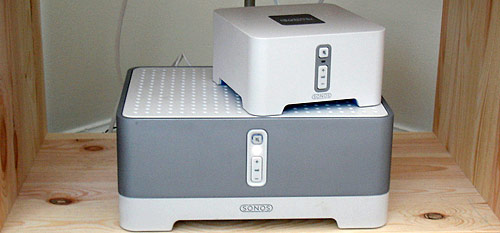
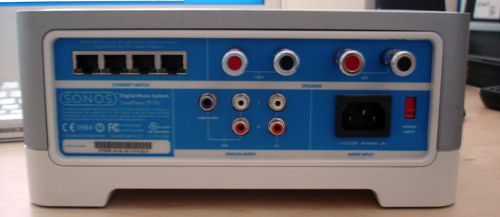
At least one ZonePlayer in your Sonos setup must be connected via Ethernet. Sonos supplies several options for getting this done, such as showing you how to setup Internet sharing. Each ZonePlayer has a built-in Ethernet switch so you don't have to sacrifice anything.
Then you have the Sonos Loudspeakers, which are completely optional. You can use any other speakers with the ZonePlayer 100 (assuming they're of the proper wattage/ohm).
 Staples easy button not included.
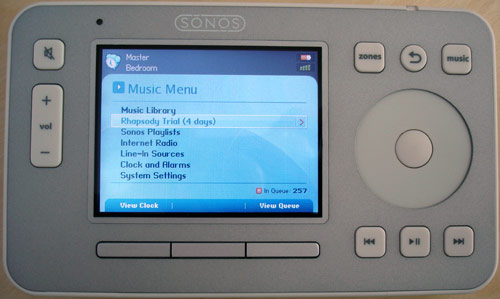
Finally, we have the masterpiece of the entire system - a high-tech gadget simply called the Sonos Controller 100. Everything can be controlled from the Sonos Controller and I mean everything. You can have the same functionality with included Sonos Desktop Controller software (PC & Mac), but using the physical controller is much more fun.
Features/What It Can Do
The Sonos Digital Music System is not exactly targeted as a solution for just one room. While you can just individually purchase just the units you need for your system, the system really flexes its muscles when your entire house is Sonosified. Since the Sonos Controllers and ZonePlayers create a peer-to-peer wireless mesh network ("SonosNet" - AES encrypted) amongst themselves, adding on to your system is painless. Unfortunately, the system can only be expanded to 32 ZonePlayers, so if your mansion has more than 32 rooms you are on your own.
You can add on as many ZonePlayers or Controllers as you'd like - each controller can control the entire system and each ZonePlayer. Different ZonePlayers can play different songs, or you can enter Party Mode and link all the ZonePlayers up to play the same music stream.
ZonePlayer 100
-
50 Watt/channel amplifier
-
Line In, Line Out, Subwoofer Out connections
-
4-port 10/100 Ethernet switch
-
Supported Audio Formats: Compressed MP3, WMA, AAC (MPEG4), Ogg Vorbis, Audible .AA files, Apple Lossless, Flac, uncompressed WAV & AIFF, PlaysForSure DRM'd Windows Media tracks. No support for FairPlay music at the moment.
-
Music services supported: Rhapsody, Audible
The main differences between the ZonePlayer 100 and the 80 are that the ZonePlayer 80 is not amplified and has a 2-port Ethernet switch.
Controller
-
LED backlit 3.5-inch color LCD with QVGA resolution
-
iPod-like touch sensitive scroll wheel
-
LED illuminated buttons that turn on in the dark
-
Rechargeable, factory-replaceable Li-ION battery
-
Water resistant enclosure
-
Non-slip rubber backing
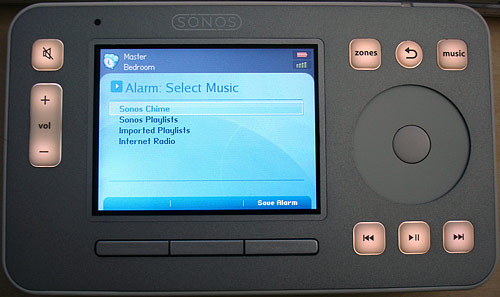
Before I get into the real features, I'd like to mention a smaller Sonos feature that I have come to use daily - alarms. The Sonos makes for the best (and most expensive) alarm clock. You can setup multiple alarms for different ZonePlayers, each with different audio sources.
Why This Thing Rocks
The Sonos digital music system has exceptional plug-and-play access to music from your personal collection which can be stored on up to 16 PC/Macs or NAS devices as well as music services and Internet radio. Essentially, with the Sonos you can consolidate every single audio file (with the exception of FairPlay tracks) in your house and have the ability to play it in any room at any time with the Sonos Controller.
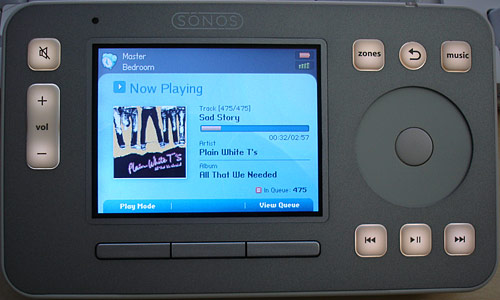
To do that, you need to install the Sonos Desktop Controller software. Installation was a breeze and it was able to import all of my songs managed by iTunes including playlists. I would have liked to see stronger iTunes integration, perhaps even an iTunes plugin. The lack of the ability to play iTunes FairPlay tracks was a huge disappointment initially, considering I have over 800 iTunes-purchased tracks.

I got my roommates to install the software on their computers too, so the Sonos was able to play all of the music in our house. The songs are played live off of the appropriate host computer, so Sonos recommends setting your computer's preferences to never sleep. Also, I had to open up some ports in the OS X firewall to make way for the Sonos. However, they had detailed instructions so anyone can do it quickly.
The desktop software also lets you add Internet radio stations if you find that your favorite station hasn't been preprogrammed into the Sonos. I usually listen to various Internet radio stations more than I do my own music, so the Sonos' Internet radio abilities was definitely welcomed. It beats making my way through the iTunes Internet radio menu.
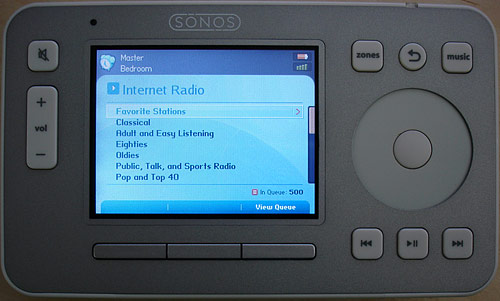
The first day of having setup the Sonos with all the music in the house, I was ecstatic. Having any song of yours at your command is an indescribably great feeling.
It Gets Better
Then I was introduced to Rhapsody on the Sonos. Oh my Steve Jobs this is @#*@#! amazing. As VisiCalc was to the Apple II, Rhapsody is to the Sonos (oh snap, yes that was an analogy - my literary prowess is nonpareil). For 10 bucks a month, you can stream just about ANY song from Rhapsody to your Sonos - all without the need for a computer. You can browse the Rhapsody collection solely through the Sonos Controller.
Rhapsody is comprised of two things - Rhapsody Music Guide and Rhapsody Radio.
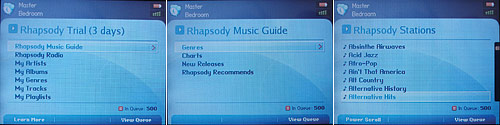
A neat thing I enjoyed about the Rhapsody radio stations was how you can skip forward to the next track. Also, if you find a track you like on a Rhapsody radio station, you can add the track or album to your Rhapsody Library, which makes it much easier to find that song later on. Speaking of which, the Sonos Controller has a system-wide music queue meaning you can add tracks from Rhapsody or your own music collection into a seamless playlist.
For example, whenever I throw parties I pass around the Sonos Controller and ask my friends to add any tracks they want to the queue - with the exception of country music; sorry, house rules. With Rhapsody's streaming music service, just about every song is at your disposal. It reminds me of jukeboxes at bars but oh so much more high-tech. The Rhapsody Music Guide organizes the music collection in various ways including genre, charts, new releases and recommendations. If you're in a bind and want some quick music for your spur-of-the-moment party, look no further than just playing all the top tracks or new releases.
Whenever I explain the whole Sonos system to my friends, they immediately focus in on how useful Rhapsody can be. My friend Dan spent at least an hour adding his favorite songs to my queue. On a decent broadband connection, playing songs on Rhapsody takes about 1 second from selection to when the song starts playing.
For the record, Rhapsody music is streamed at 128kbps so audiophiles might be a bit offended.
Zones
With the Sonos' pricing, users are more likely to use their Sonos along with other equipment. Fortunately, the Sonos plays nice and accepts a line in input for each ZonePlayer, allowing you to select that source through the controller. For example, you can hook up a friend's iPod to your ZonePlayer's line in and play it through your speakers.
As I mentioned in the beginning of this review, the Sonos excels when controlling multiple ZonePlayers.
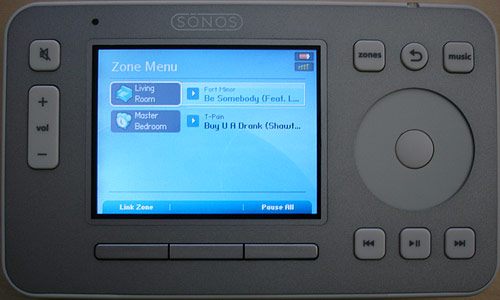
All you need to do is select the ZonePlayer you wish to control and manage it as normal. Each ZonePlayer has its own queue as well. Party Mode allows you to link all your ZonePlayers to play the same music. You can have different volumes on each ZonePlayer though.

About the Sonos Controller
I have nothing but praise for the controller. The interface is highly intuitive and the controller is the perfect size to be held and used by two hands. The back has two rubber ridges for holding onto and is a comfortable device to use. That's good to know considering you'll be using it all the time.
The Sonos controller has a sensor that detects light changes to illuminate the buttons. The sensor also detects movement/motion. Whenever the screen turns off (you can set that time yourself - mine's set for 1 minute undocked, 5 minutes docked), I usually give it a brief jiggle to wake up. Pressing a button does the same thing, but it's not nearly as fun.
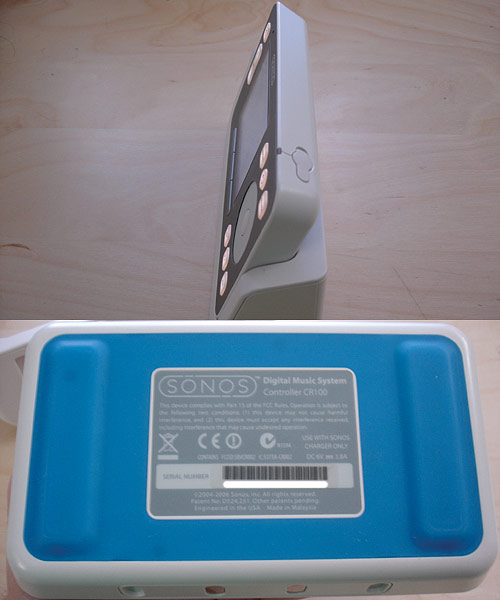
Going back to the Sonos Controller's UI, there are many little features that add to the experience. When browsing your library for example, scrolling through thousands of tracks can get tiring. Fortunately there is a power scroll button so you can skip directly to the letter of your choice. The touch-sensitive scroll wheel acts familiarly like the scroll wheel on the iPod with a few differences. With the Sonos Controller, the scroll wheel is pretty much just limited to scrolling through lists. It can't be used to seek through currently playing songs, or adjust the volume. Fast-forwarding through songs requires that you hold the fast-forward button, which gets a little annoying for something that could have been executed flawlessly with the scroll wheel.
At 3.5 inches with QVGA resolution, the Sonos Controller's vibrant screen is pleasing to the eye with fancy fading menu transitions and a snappy response time. Everything about the interface is aesthetically graceful. Although, I would have liked the ability to display the current time in the top-right of the screen, next to the wireless connection strength and battery level indicators. For comparison, take a look at the interface of a competing high-end control manufacturer, Creston.
The Sonos Controller has two forms of sleeping to preserve battery power. There's deep sleep which happens after four hours of inactivity and then there's the light sleep which essentially just turns the screen off until you move it/push a button. I had a minor issue with the controller's deep sleeping. Whenever I had the Sonos alarm clock go off in the morning, the controller would be in deep sleep and take a while to wake up. In the meantime, I would be deafened by the alarm which I had set play an Internet radio station ridiculously loud. Although this can be considered a good thing as I had to physically leap out of bed to manually mute the Sonos (there is a mute button on the ZonePlayer). Okay, I might have exaggerated a bit as the controller wakes up from deep sleep rather quickly but no one enjoys being deafened in the early morning (1-2PM college time).
As for battery life, I didn't pay too much attention to it but it never became an issue.
Wireless Performance
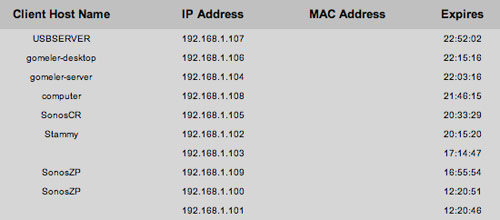
Even though you are only required to hook up one ZonePlayer via Ethernet, the Sonos system is smart enough to give a unique IP to each ZonePlayer and Controller within its mesh network. Below you can see proof of each Sonos device as seen by my router.
I only had a limited test range in our small, off-campus 1300 square foot townhouse. I had one ZonePlayer on the third floor and another ZonePlayer on the second floor of the house and was able to control both ZonePlayers on all floors. In addition, I was able to control them out in the street about ~75 feet away from the second floor ZonePlayer. That's about right when taking into consideration Sonos' claim of a 100 foot wireless range from Sonos Controller to nearest ZonePlayer. Since the ZonePlayers communicate with each other, it only matters that you are within range of at least one of the ZonePlayers.
Sound Quality
I honestly can't tell you too much about audio quality as it depends on your choice of speakers (and amplifier in the case of the ZonePlayer 80). I can tell you about the ZonePlayer 100 and Sonos Loudspeaker combination though. They emit sound one would expect a system with a subwoofer would create. I was surprised at the amount of bass that these relatively small speakers can produce. Treble sounded crisp when testing techno songs.
You can set the bass, treble, balance as well as loudness mode for each ZonePlayer.

They're easily loud enough to satisfy a crowded living room with 25+ intoxicated happy college kids.
You will be able to discern a distinct difference in sound quality between Rhapsody/Internet radio and your own uncompressed, high bit rate WAV files though.
Suggestions
While the Sonos Controller is fantastic at what it does, I think Sonos should provide a supplementary controller much smaller in size. Ideally I had something in mind in the Apple remote form factor, that you can keep in your pocket at all times at a party and quickly adjust basic settings such as volume as well as play/pause/next, etcetera. Considering that most Sonos customers will have multiple ZonePlayers in their setup, the proposed smaller controller would need a way to select between ZonePlayers - most likely a small screen which would add bulk and defeat the purpose but ideas can't hurt.
Also, I would like the next revision of the Sonos ZonePlayers to be able to latch onto my existing wireless network so I don't have to feed it an Ethernet line.
Worth Your Money?
If you are an audiophile, have a massive collection of music or just love gadgets, the Sonos is definitely for you. The Sonos digital music system can liberate your music currently confined to your computer. For me, the Sonos was incredible for the way it provided a "front-end" for the many Internet radio stations I frequently listen to. If the Sonos only did Internet radio and music service stuff, I wouldn't mind it at all. But for such a price, I think Sonos could have thrown in FM radio capabilities. Granted, FM radio is out of Sonos' high-tech scope, it would have made some customers' receivers obsolete.
Reading this at home, you might think Sonos is just another new-fangled ubergizmo. You really have to try it out first hand to know what you're dealing with. I can see a simple Sonos setup being the highlight of a modern bachelor's pad as well as a comprehensive house-wide audio system for my parents. Despite the price, I give the Sonos Digital Music System a 9.6 out of 10 Stammys. Below is a cheesy photo.
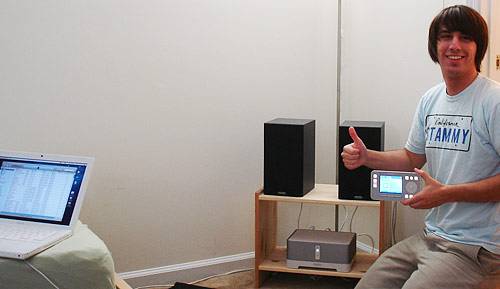 Disclaimer - I took this photo at 6am. Yes, I am aware that I need a haircut.