An Open Letter to the Google Docs Team
Dear Google Docs & Spreadsheets Team,
I am an active Google Docs user. I have been around since the Writely days and know everything there is to know about using Google Docs. For me, the collaborative writing feature is top-notch and I have given you many new users due to this feature alone. Whenever I have to form a group for some class or another, the first thing I do is set everyone up with Google Docs and create a document we can all work on. It’s an excellent way to write group papers. I have used Google Docs to write ridiculously long heuristic UI evaluations, website usability critiques, dozens of papers for various classes as well as take notes in class.

Some of the many documents on my Google Docs account.
But there is a problem. At Georgia Tech, it is dead week meaning that next week (finals week) I will have written 20+ pages worth of papers for various classes. The problem comes with the fact that it is damn hard to get a real sense of how much you have written in Google Docs due to the lack of a proper, ruled page layout view. I have gotten to the point of frustration; continually copying and pasting my documents into a real word processor to see how many more pages I have left to write.
For example, I have a 5 page paper analyzing YouTube due for my social media class. How do I know when I’ve hit the magical 5 page limit? There is no consistent way to get a sense for document length other than just sheer word count. Currently, the only way to see actual page length and layout is to click around and display a print preview. Even that is unsatisfactory with no way to adjust page margins.
Proposed Changes
- Page Layout View with rulers displayed
- Mechanism for easily switching between views
- Ability for users to interact with the rulers and see live changes (ex: dragging slider to adjust margin)
- Document page length and status displayed in footer (ex: “Page 1/4″)
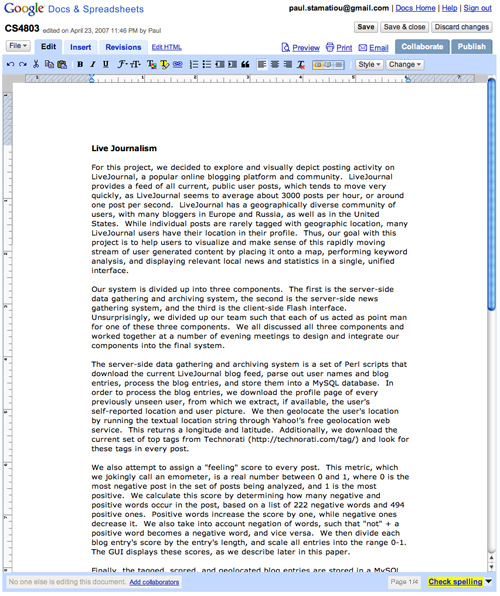
In this mockup I have created in Photoshop at 5am, you can see three alterations to the friendly Google Docs interface. First, there is a selector nestled between the remove formatting button and the style menu. This selector allows the user to quickly change document views - page layout, book layout and normal. Then there are the obvious rulers representative of the page layout view. Ideally, users would just be able to drag the sliders on the ruler to adjust page margins on the fly. Finally, the cherry on top of it all is a simple footer inclusion of a page indicator displaying current page and total page counts.
Who Benefits?
Everyone, really. I have setup enough people with Google Docs to know that I’m not the only one that gets annoyed from not knowing how much I have actually written. And when you factor in the current trend of massive displays and the fluid display of text in Google Docs, one page of text looks like a mere 3 lines on a 24-inch display. I have seen new users endlessly click everywhere looking for some hidden options panel to present them with a page layout view. Fortunately, I had been there to inform them that such a feature does not exist so they can save themselves 30 minutes.
Incentive
Initially I was going to put up an Apple iPhone to the Google developer that spearheads the launch of this long-needed feature but then I realized I would rather pay rent. So, if the aforementioned features or something like them are to be found in Google Docs by July I will gladly take the Google Docs & Spreadsheets team out to enjoy a fine dining experience at In-N-Out. I plan on being in California for several days in July.
Sincerely,
Paul “Stammy” Stamatiou
Google Docs user and college student


I totally agree with you. You can end up writing lot’s of lines and then you don’t know how many pages you wrote, doing that ridiculous task you said - pasting the text on a real word processor (open office, in my case).
I also use it to take notes on classes and stuff, so one more to sign this letter ;)
A friend of mine had showed me Google Docs a couple months ago, but I’m not really that interested. I mean, what happens if Google Docs were to go down and you had a paper that needed to be handed in?
I love the idea, but the whole doing everything online thing scares me a bit.
Well now I’m back to finishing my assignment due tomorrow morning at 9am, and it is currently 3am. Yay! I have another 2 hours or so of solid work. I love to procrastinate =)
Hi Paul,
I’ll make sure the team sees your post… We love input like this from a loyal user - particularly when it comes with a solution proposed and designed ;)
As you can imagine, we get so many requests for enhancements, so it’s tough to prioritize - but we’ll try hard to keep you as a happy user.
Seems like the priority for you would be to first display the simple “page 1 of 4″ footer… I expect there would be some tweaks to that number based on the printed page size and line spacing?
We’ll check it out!
Thanks!
Paul,
The reasons that you outlined above are the the major reasons why I still use open office, as opposed to google docs.
That is such a huge coincidence! 2 mins ago, I was at Google docs, realizing the lack of a page layout.
Hey, a new slogan for you, Paul!
“When Stammy speaks, Google listens”
This is a great idea, Paul. I use Docs a lot, and this is something I would appreciate as well.
I have noticed the same problem, and I like your mock up & solution. What I actually do now is copy-and-paste the Google Docs into MS Word before printing. How inefficient is that?
Oh please google implement this. I can barely stand to use the software because it doesn’t give me any sense of what it will print like. PLEASE.
Great initiative Paul, its missing features like this that made me still stick to MS Office. Hope Google implements this.
@JR - thanks!
I only use GoogleDocs as a portable notebook at the moment, until it has features similar to a real office system, I’ll stick to NeoOffice on the mac.
I’m in agreement with Paul on this too. These are must have features to make Google Docs a great tool.
Wonderful post Paul - I am totally with you on this as a PhD student. After they do this, then we can ask them to make it usable in safari. Though google docs does work pretty well in ol’ webkit.
and don’t forget to post when it is rolled out, please, Paul!
google docs sounds cool, but is lacking in a couple of areas- paging being one of them.
Make Phil Freo implement this in his 20% time over the summer. That’ll work, right? He’ll be the all-star intern if he does. I’ve personally never used Google Docs as VoodooPad, WriteRoom and OpenOffice keep my attention too well. This does sound like a missing feature that would frustrate me, though.
Add me to the list of supporters of this upgrade. Right now I use Docs as more of a storage place or a temporary editing place, not as a full docs program. This change would probably convert me.
Google docs are awesome for straight up writing projects, but for larger lab reports I always just end up using Microsoft Word, their table of contents feature (automatically converting headings to table of contents with pages) definitely makes life easier.
brilliant. i’ve been yearning for the page count feature for some time, although all credit goes to the man who takes the time to mock it up in photoshop :)
Couldn’t you just hit the “Print” link above the toolbar in Google Docs and view the print output - or maybe do a print preview from there to see the number of pages you have?
It isn’t as slick as the solution you proposed, but it would keep you from having to open Word and copy/paste your content over there every time you want a page count.
@Jeremy - print preview doesn’t take into account the page margins that I want to have set, so in effect the page count would be off considerably depending on layout settings.
I love it!
However, I think the reason for the lack of proper margins is that print margins are a browser level setting, and there’s no way for a web page to know what the user set the margins to be. At least no way I know of. So in order for Google Docs to properly print margins it would have to create a PDF to print from.
Which, honestly, wouldn’t be that bad…
another great feature would be to allow documents stored on box.net to be opened, edited and re-saved from within google docs. Box.net already uses zoho for this feature, but since I many of us use google docs it would be nice to have the option.
You know javascript, right? I wonder how hard it is to incorporate some of these changes with a greasemonkey script.
@Laura - I have actually been wondering about doing that, maybe I’ll tinker with it this summer..
Great ideas!
Looks like I’m the only person who disagrees with the proposal. The thing I really like about Google docs is that it’s really simple and uncluttered, and I don’t have to worry about setting up page settings, I can just get on with writing. Why bother copying everything into Microsoft Word; why not just write it there in the first place. I don’t think Google docs should be a full featured application, the appeal of web 2.0 is very different.
@”A different Jeremy” - My proposed idea has the functionality to change views with the default view being the way it is. This means you can do whatever you want and people that need the extra functionality can just select a different view. As to why I didn’t just write my papers in Word to begin with - I absolutely need my documents to be mobile and online as I work on many different computers on and off campus. As for the “appeal of Web 2.0″ - it’s diverging to emulating the desktop environment online, so obviously these features will have to make an appearance sooner or later.
different jeremy, perhaps you should go back and re-read. I think it’s pretty hard to dispute that Google Docs needs a way to actively track how many pages you’ve written so far, word counts are nice, but page counts are necessary for many.
the appeal of web 2.0 is very different? huh? What?
Try the word count feature young jedi. It now tells you estimated number of pages. - Master Yoda
@Steve - yeah but you have to fidget through a menu for that when you want it - it’s not always visible in the footer as it should be. Furthermore, with a page layout you wouldn’t have to resort to that, you would always have a visible sense of how many pages you’ve written based on the margins you have set.
This really Sucks, I’m on a library computer and i really need to print this out. BUT IT WON’t work… Google Please take him up on his proposal
I’m also a keen user of google docs, but it would be difficult to consider using it to write any “serious” academic work without the footnote feature (at least for human sciences). :-(
Hey, Im just wondering is there a way to get more people to veiw
my google document? I really want at of people to see it but I am nto sure
how to get them to see it. Any way?
http://docs.google.com/View?docid=dfrp7npp_0hrg95g
RE the count words feature:
mm… yes it is hidden in a menu, but it is nice for a mini break.
(and I’m curious that you get pages for your assignment specs rather than a word count?)
These problems can be solved by using CoWord (http://cooffice.ntu.edu.sg/coword) which converts MS Word into a real-time collaborative word processor. You can do collabortive word processing with MS Word, with most Word functionalities including page view, word count, footnote, etc. Moreover, changes you make in the document are immediately displayed on your collaborators’ screens.
If you worry about the server being down, you can set up you own server.
@David - that still involves me setting up software on my machine. The point of internet web apps is that the client’s machine makes no difference and I can go from machine to machine without a problem.
@Paul Stamatiou - I agree with you on that. This is the major disadvantage of conventional desktop software. On the other hand, webtop application has the major disadvantage on their functionalities, which I believe cannot be solved in the coming years and will prevent them from being used in serious occations. In recent years, software installations are reaching giga bytes. I cannot imagine they can be replaced by web-top systems. So these two kinds of apps will find their own niche in the future. Users will make their choices based on their needs.
BTW, I am interested in trying new software systems and found many of them are not so difficult to install. Once you have installed, starting it up is much easier and faster than opening a web page in the browser.
Paul, Since you know much about Google docs, I’m wondering if there a feature that allows you to open a local Word document or text file? I am looking for a simple way to replace MS Word on my clients desktop. Most of them don’t need the power but just simple letter writing ability.
I can live with the import function for the spreadsheet so my clients can edit and save using the spreadsheet. I was hoping for a way to do the same with the word processor. The majority of my clients only need to do the simple things like making lists of information to share and writing a simple letter that an email could do. But Google Docs has enough function to make it pretty and to even share it. That’s what the majority of my clients need. Simple…
@Jonathan - you can currently import the following file types with Google Docs.
Here’s a link to that help page:
http://docs.google.com/support/bin/answer.py?answer=49111&query=import&topic=&type=
Does it help to do a “Preview” in GDocs, then do “Print Preview” in your browser? I have my Firefox margins set to .5″ and it works well when I do it this way (margins and # of pages).
ZohoWriter has done it with their page view.But they do not have the vertical ruler.Check it out.
In my opinion, the possibility to have a real page layout in gdocs is a good thing, but they need to keep the actual layout too, since there is users that really like not knowing how much they had write until not finished all the text, like me.
Ohhh man, i would love if the Docs Team took your layout suggestions serious….
Really noce post… Thanks
Well, more than a year latter and Google Docs still lacks those features…