Twitter: dinner with @bellmor

New OpenDNS Feature Revolutionizes the Net

Apr 22, 2007 in ,

OpenDNS CEO David Ulevitch just let me know about a new OpenDNS feature launching tomorrow simply called shortcuts. Similar to how your browser has bookmarks, OpenDNS shortcuts let you pair a word with a URL so that when you type that word in your address bar, you’re taken to that website. These shortcuts work regardless of your OS or browser - they are dependent upon your OpenDNS-enabled network. Simply login to your account and setup the shortcuts.
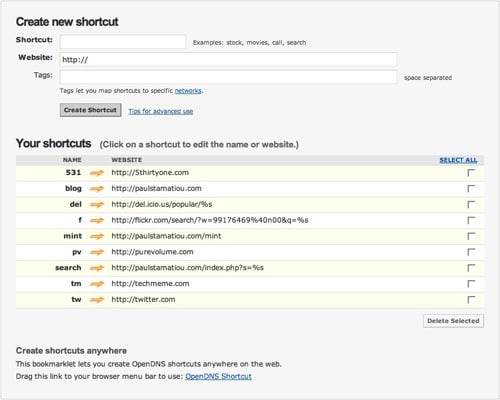
OpenDNS Shortcuts

Furthermore, you may opt to create more advanced shortcuts that contain parameters. To clearly illustrate the possible use for shortcuts with parameters let me take you through a simple example. If you have a WordPress blog you can setup a shortcut in the format of

http://paulstamatiou.com/index.php?s=%s

where %s is the parameter OpenDNS uses. If you save that shortcut as something like search, you can search my blog by typing a query in your address bar like this:

search opendns

That shortcut will load a page on my blog with search results for OpenDNS. That is a rather basic example and there are many ways shortcuts and parameters can be used together to simplify your online life. OpenDNS gives an example of a shortcut that lets you grab stock quotes from Yahoo! Finance. Basically, to create a parameter-taking shortcut for searching a site, go to that site and execute a search for anything. Pay attention to the resulting URL, find the place where the query went, replace it with %s and create a shortcut with it.

To help you out a bit, here are some shortcuts I’ve researched to get you started with OpenDNS shortcuts.

flickr

http://flickr.com/search/?q=%s

flickr search for your photos

http://flickr.com/search/?w=99176469%40n00&q=%s

Replace the w value with your flickr user id which you can find with idgettr or running a flickr search for your photos.

digg frontpage stories

http://digg.com/search?s=%s&section=news&type=both&area=promoted&sort=new

del.icio.us popular

http://del.icio.us/popular/%s

9rules

http://9rules.com/topics/%s

facebook

http://facebook.com/s.php?q=%s

Lifehacker

http://lifehacker.com/search/%s

Wikipedia

http://en.wikipedia.org/wiki/%s

OpenDNS has also created a bookmarklet that lets you create shortcuts on the fly. Simply click the bookmarklet when you’re on a site you want to make a shortcut for and type in a name for the shortcut in the pop-up.
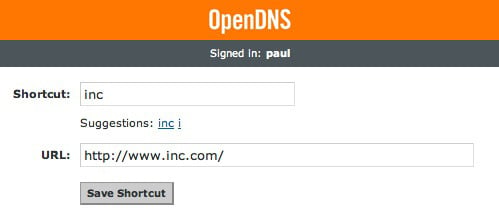
OpenDNS Shortcuts

As David Ulevitch explained to me, shortcuts really do change your Internet experience. This is exactly the type of thing I love blogging about - technology that impacts and aids you in your daily tasks.

You can shortcut anything that can be expressed as a URI. I have a shortcut named “call ” that interfaces with my VOIP phone and address book, for example. It’s powerful stuff. It makes my address bar actually start doing what I want.

Shortcuts will go live April 23rd PST, so look out for them. What do you think of OpenDNS shortcuts? Will you use them?

Update: It’s LIVE.

Promote this article on various sites or email to your friends:     


49 Comments

  1. Wow, I really love opendns and this is great. Thanks for the heads up Paul.

    btw. Dugg - http://digg.com/tech_news/New_Open_DNS_Feature_Tomorrow_Shortcuts

  2. Very cool. Now all we need is for more internet users to use OpenDNS.

  3. Yesssssssssssssuh

  4. Wow. Dugg. My own contextual tiny url. Now all I have to do is get everyone in my house to agree on the shortcuts. Thanks for the heads up.

  5. Awesome new feature. I’m loving OpenDNS more and more.

  6. How is this different from a plugin for browsers that does the same thing as far as functionality?

    I like the idea a lot, but just fail to see the advantage of this over a plugin. For example, if I type in “wiki stammy”, browser will redirect to Wikipedia and search for “stammy”..

    For Safari, there’s Sogudi that does exactly this: http://www.kitzkikz.com/Sogudi
    Dimitry

  7. @Dimitry - because OpenDNS shortcuts are network-wide changes. Meaning I only need to set it up once and I/my roommates can take advantage of shortcuts on any computer in the house.

  8. BTW…I know you are #2 on Google…but I just set up “paul” on OpenDNS for here. ;-)

  9. I’ve been using Firefox keywords, synced via the del.icio.us extension lately, but that doesn’t run in IE.

    Is there a write up somewhere about how it recognizes you? I was logged in from the same machine via Firefox first and it worked, but wouldn’t work via IE until I logged onto my OpenDNS account there too. That suggests it’s not just IP based, but I don’t see how it’s able to do anything cookie based for such short keywords.

  10. That’s awesome - I’m so switching back to OpenDNS.

  11. Joost,

    Good question! I’m hoping to get some technical details posted at http://opendns.com/start/features/shortcuts later tonight or tomorrow but for now let me try to explain:

    We do them IP based if you assign the shortcuts to a network. You can do that via the “shortcuts” option when editing any of your networks.

    If you don’t do it that way, then you need to do it via your username which we track with a cookie when you hit the OpenDNS Guide page at guide.opendns.com. If we don’t see a shortcut there via your username, we send you search results.

    Finally, if you don’t have shortcuts via your network and you aren’t logged in, you *can* still create shortcuts without an account just by creating them on guide.opendns.com but then they are totally cookie based and won’t be saved until you create/sign-in to your account. When you do that, your temporary shortcuts will automagically transfer into your account and be saved for use on any computer.

    This way you can make a ton of shortcuts on your desktop and then sign-in to opendns on your Treo and use them on it, without having to suffer the pain of creating them on a mobile device. :-)

  12. David: Got it now. If it’s not a valid hostname, you redirect back to guide.opendns.com with querystring data and look it up against shortcuts, at which point, you get the cookie settings from the browser based login to know who to look up under.

  13. Now I’m going to have to decide whether to use this feature of OpenDNS or stick with YubNub (yubnub.org) which does the same thing but with tons more shortcuts available.

    For OpenDNS: I can do it for every computer in my house once only. I can make my own without worrying if the shortcut is already taken. It will shave seconds off my page load times.
    Against OpenDNS: I can’t use the shortcuts at work or elsewhere.

    For YubNub: Available anywhere.

    Against YubNub: Have to set it up on every computer I want it on.

    I might give OpenDNS a shot at home and see if it makes a difference. It sounds like an excellent feature. And your readers should check out YubNub if they like the sound of this.

  14. @joshnunn - can’t you just login, enable OpenDNS at work and add your work IP to your OpenDNS account? perhaps it’s restricted at your work though.

  15. Paul, I work at two schools. Internet access and configuration is handled at a state level. I could do it, but it might not be the best thing for the kiddies. I’m also the school’s tech, and I worry that I’d be breaking some rule to set it just for myself. Less hassle to just use yubnub.

    Didn’t realise that you could set multiple IP’s though. That’s handy.

  16. No offence Paul (and David), but this kind of functionality has been built into Opera and FireFox for years. The new del.icio.us Bookmark extension adds to this functionality and synchs those keywords so they’re available anywhere.

    I’m using OpenDNS at home by the way, definitely an excellent service!

  17. @Gerard - I’m aware of Firefox keywords and all of that. The thing I wanted to bring attention to was that these features can be had at the DNS level instead of merely on a per-computer per-software level. I work on my desktop and laptop equally as much everyday and having the same setup on each is great with shortcuts.

  18. @Gerard — This is just the first steps in really helping people make the address bar and navigation work. In my mind, the network should just work and be more intelligent. You shouldn’t need more software installed to make it happen. Moreover, I view my web browser as a canvas — a blank slate that does what I want it to do. That’s why web apps are so powerful. If my browser’s address bar was a bit smarter, it’d be perfect. My goal — make the address bar smarter. :-)

    -david

  19. Paul, do you remember Keith Teare’s earlier venture, RealNames?

    OpenDNS smells like RealNames with a new coat of paint.

    http://searchenginewatch.com/showPage.html?page=2164841

    http://www.theregister.co.uk/2002/05/13/realnames_goes_titsup_com/

    http://news.com.com/2100-1023-911942.html

    I’d like to know what OpenDNS does that RealNames didn’t promise to do back in the day.

    Until then I remain skeptical.

  20. Paul, do you remember Keith Teare’s failed startup RealNames?

    I’d like David to explain how OpenDNS is different from RealNames.

    While I agree the DNS system is far from perfect, it’s not nearly as broken as SMTP is. I’m also very skeptical of anyone who wants to be an intermediary between me and my dns server.

  21. It’s a good feature, but I’ve got that set up in Firefox. Does OpenDNS still have those ads on its 404 page? That was the main reason I stopped using them about a year ago.

  22. @zzap — Yeah man, but now they are much more relevant and only show up when we have something targeted. We do have to make money. Do you avoid Google and Yahoo search too? :-)

  23. Well, I’m an OpenDNS user for a long time — I don’t own an account, just use their DNS servers.

    Here’s something I’ve noticed during the last day or two. Correct me if this is (1) a minor glitch, (2) something wrong with my setup, or (3) an undesired side-effect of this new OpenDNS feature.

    Previously you could just type “gmail” in the Firefox address bar (without having to set up “gmail” as a keyword for the “gmail.com” bookmark) and it would get you right to gmail.com. I assume it would do that by querying Google and going automatically to the first result.

    Now if you do the same, it takes you to an OpenDNS-powered search results page for “gmail”.

    Can you see how this breaks a welcomed functionality in Firefox? Again, please correct me if this is (1) a minor glitch, (2) something wrong with my setup, or (3) an undesired side-effect of this new OpenDNS feature.

  24. @Konstantinos - That firefox behavior shouldn’t break. It’s possible the Google “I’m feeling lucky” behavior might have in some browsers. Can you email me offline so we can figure out what’s going on? I’m david [foo] opendns [bar] com.

  25. @Gen: “OpenDNS smells like RealNames with a new coat of paint.”

    From my brief reading of those press releases I get the idea the realnames was a system of keywords that resolved to internet addresses through some system that was integrated my microsoft. It was fully controlled by the company and paid for by sponsorships from those companies. It also seems it was trying a little too hard to fix something that wasn’t broken.

    OpenDNS on the other hand (and correct me if I’m wrong you others) is simply a couple of IP addresses you replace your DNS servers with to get faster DNS queries that fix your spelling errors. Nothing like RealNames. Then on top you can add extra functionality such as ’shortcuts’ that seem to be like RealNames keywords, but are far more like the keywords you can set in Opera/Firefox/del.icio.us etc. Plus, you control the keywords and not some mega-corporation.

    And if the service ever goes ‘belly up’ then switch your DNS server back and switch to using firefox keywords again. No worries.

  26. @joshunn - Yep, that’s right!

  27. That sounds like a really neat feature, I used openDNS for a while, but I just found it to be slower going without it, but I may have to give it another try with this

  28. Great feature, but not an internet revolution by a long shot!

  29. It’s a net revolution for me.. I visit too many sites/day and saving any of my time is always welcome.

  30. David, joshnunn, thank you for clarifying the service for me. I understand that it is not like RealNames. That said, I’d like for OpenDNS to be more open about their business model. What benefit does OpenDNS get by being my dns provider? What is the revenue model?

  31. @Gen - It’d be hard to be *more* open! :-) We answer that on our FAQ and it’s not hidden either. We make money from advertising when we can’t correct a typo. We get our search results and ads from Yahoo and we have really good technology to take DNS errors and try to give you the right result.

    Try some typos manually like:

    http://guide.opendns.com/?url=delll.com
    http://guide.opendns.com/?url=dulevitch.com
    http://guide.opendns.com/?url=goggle.com

    We don’t sell our DNS data, we don’t abuse your privacy and we care a lot about providing a great service.

    Happy to answer more questions…

  32. I don’t get why this would be a cool thing to use, especially when Firefox does it right out of the box like others have mentioned here. I’ve posted my thoughts on this on my website, here:

    http://www.kinggary.com/2007/04/24/opendns-does-something-...

    It adds some more of my insight to this discussion.

  33. I don’t get why this would be a cool thing to use, especially when Firefox does it right out of the box like others have mentioned here. I’ve posted my thoughts on this on my website, here:

    http://www.kinggary.com/2007/04/24/opendns-does-something-cool-but-firefox-already-does-it/

    It adds some more of my insight to this discussion.

  34. I’ve been using open dns at home and work (don’t tell anyone :D ) ever since your first post on it. Thanks for turning me onto it. Shortcuts is an awesome feature and look forward to setting it up and using it.

  35. Damn, this is cool. I was considering that it would be odd, because firefox did it naturally, but I’ve always wanted to do something like this.

    I have a ton of bookmarks though, so I like to use those, and my bookmarks make it so I can just it pau and hit enter to go here.

    Most of all, though, I think it’d be weird to have opendns do this, instead of a browser, and protect me from phishing. It sounds super cool, though..

  36. Conner,

    Would you want a way to import your bookmarks into a list that you then just create shortcuts for the ones you want to keep?

  37. Could these openDNS features be linked to providing keyboard access to keyboard users?

  38. Just installed this, it’s excellent. So much quicker for me.

  39. Notify me of followup comments via e-mail

  1. [...] to a recent post by Paul Stamatiou, I got a quick heads up on a brand new feature of OpenDNS. Shortcuts in OpenDNS are just about the [...]

  2. [...] you type something easy-to-remember into your address bar and leap straight where you want to go. Paul had written a post about the new feature on OpenDNS. To set these shortcuts, simply login to your [...]

  3. OpenDNS Introduces Shortcuts…

    David Ulevitch, founder and CEO of OpenDNS, sent me an email yesterday letting me know about a new feature from OpenDNS. It’s called Shortcuts and looks really sweet. Shortcuts are very simple, similar to bookmarks in your browser. Here’…

  4. [...] been a bit of talk about a new service provided by OpenDNS, a ‘free domain name service’, which allows [...]

  5. [...] Lifehacker, New York Times, PC World, Computerworld and Techworld. And it should be mentioned that Paul Stamatiou gets the award for being the first to blog [...]

  6. [...] OpenDNS add “shortcuts” - I already use LaunchBar for this functionality, which is akin to editing your HOSTS file. [...]

  7. [...] into any more detail about OpenDNS shortcuts, I’m gonna direct you over to Paul Stamatiou. Paul already has a great post with some screenshots and examples of shortcuts, go check it [...]

  8. [...] there’s one feature - a convenience - you should avoid, and ironically it’s called a shortcut.   Ironically, [...]

Post a comment, receive Stammy points.


Send a trackback.


  • If you plan on posting code, run it through Postable first.
Copyright © 2005 - 2008 PaulStamatiou.com  Privacy Policy - Terms of Service Can't spell my name? Use PSTAM.com. Go back up ↑.