Twitter: @bperdue I see you

Review: Elgato EyeTV Hybrid

Mar 11, 2007 in , ,

When it comes to turning your Mac into a multimedia machine with a TV tuner, there isn’t much of a choice except for products by Elgato. I’ll be taking a look at Elgato’s EyeTV Hybrid, an affordable OS X-compatible TV tuner complete with a software bundle. Elgato sent me an EyeTV Hybrid to review, so let the review begin.
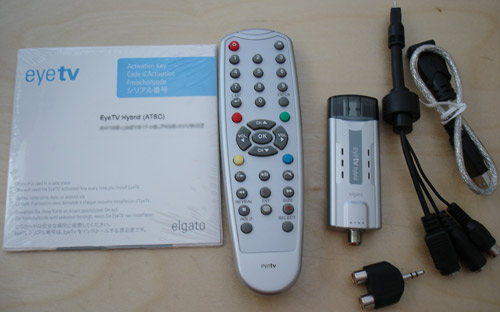
EyeTV Hybrid

Specifications

The EyeTV Hybrid possesses an attractive form factor - slightly larger and thicker than the Front Row remote. It interfaces with Macs via a single USB 2.0 port and connects to antennas and cable via a female coaxial jack. An included break-out cable allows you to input video to the Mac with S-Video and composite, which opens up the field for attaching a Wii to your large LCD.

More interesting, however, than all of that is the EyeTV’s ability to play OTA ATSC HDTV.. eek that’s a lot of acronyms, and regular analog NTSC broadcast television. The first of what I just mentioned is over the air high definition TV that’s offered in the US - most large broadcast networks offer popular programs in HD without the need for cable/satellite service. CNET has more on receiving HD programming over the air.
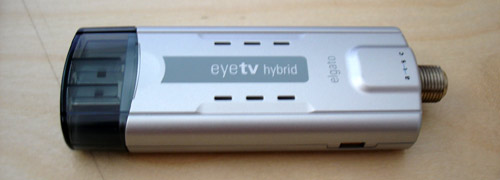
EyeTV Hybrid

Setup

Getting the EyeTV Hybrid up and running took no more than 10 minutes. Insert the CD, drag over the EyeTV digital recorder application, launch it and run the setup wizard after the EyeTV Hybrid is plugged into an available USB port. The wizard takes you through basic configuration and finally autoscans for channels to add. Give it your zip code and it will suck down program guides from TitanTV.

EyeTV Hybrid
Scanning for channels.
EyeTV Hybrid
It’s amazingly easy to get accurate program listings.

Software

Overall, I was pleased with the interface and ease of use of the EyeTV software. There are two interfaces - one for full-screen and a regular one with a controller companion. The most attractive part of the EyeTV Hybrid for me, besides the form factor, is the ability to easily record TV or schedule programs to be recorded. If you’re browsing the program guide and see a show you’d like to record, all you have to do is click on it then add it to your recording schedule - just 2 clicks.

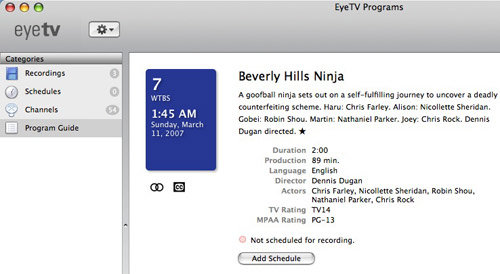
EyeTV Hybrid
EyeTV Hybrid
EyeTV Hybrid
Channel view

Then, when the time for that scheduled recording rolls around, EyeTV will start recording.

EyeTV Hybrid

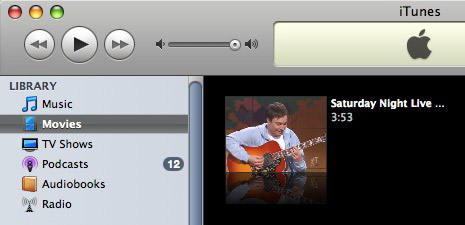
However, the recordings do take up a good chunk of space. With the default settings, I used up 2.5GB for 54 minutes of DVD-compliant MPEG-2 recording. Fortunately, recording at this quality allows you to burn the video to DVD if you have Roxio Toast installed, in addition to encoding it for your video iPod. I was able to convert a 4 minute, 185MB video clip I recorded with EyeTV to a 23.6MB H.264-encoded m4v file. After the file was in an iPod-friendly format, it was automatically imported into iTunes for me.
EyeTV Hybrid

The EyeTV software is also capable of basic video editing.

EyeTV Hybrid

As you would expect for a DVR application, live TV can be recorded to a buffer, allowing you to fast-forward, pause and all that great stuff. In addition, EyeTV can be controlled via AppleScripts, which make it a great application for any coder to tinker with. An example AppleScript for EyeTV might be the following:

tell application “EyeTV”
   channel_change channel number 40
   start recording
   delay 300
   stop recording
   channel_change channel number 4
   enter full screen
   mute
end tell

Quality

It’s hard for me to judge the picture quality as the Comcast cable line I share with my roommates has more static than my hands after running around on carpet with socks on. However, I have faith in the hardware and believe picture quality would be flawless given a pristine signal. I did, however, mess around with receiving ATSC OTA HDTV signals and found that the EyeTV software automatically increased the size of the window for high definition viewing when it detected an HDTV signal.

EyeTV Hybrid
The EyeTV Hybrid latched onto an ATSC signal and increased the window size.
EyeTV Hybrid
Regular, non-HD programming. Blame Comcast for the static.

Full-Screen Viewing

The EyeTV software excels when it comes to full-screen viewing. Just about everything you can do in the regular application can be done in full-screen mode, and is controllable via the Front Row remote (which makes me wonder why another remote is bundled with the EyeTV Hybrid).

EyeTV Hybrid
EyeTV Hybrid

Using the EyeTV software doesn’t conflict with Front Row at all. When you hit the menu button on the Front Row remote, Front Row appears as usual. It’s only when EyeTV is open and you hold down the menu button that EyeTV launches into its full-screen mode.

EyeTV Hybrid
EyeTV Hybrid
The interface looks great.

Verdict

Simply put, the Elgato EyeTV Hybrid rocks (and I wasn’t even paid to say that!). For a retail of $149.95, the EyeTV Hybrid is a great complement for that Mac Mini serving as your HTPC in the living room or even your MacBook serving double-duty as computer and TV in the dorm. Compared to other TV tuners, the pricing for the EyeTV is right on and the great software puts it in a league of its own. However, as a small nitpick, the EyeTV Hybrid USB dongle tends to get toasty during use.

For the best EyeTV Hybrid experience, you’re going to need a Mac with an Intel Core Duo processor or better as well as a good antenna or at least a cable connection without too much static. The processor’s speed is important as the EyeTV Hybrid relies on a software encoder for analog TV.

One thing I forgot to mention was that the EyeTV software can export recorded video to a number of formats, not just for your video iPod. There are also presents for Email, Web, iMovie, iMovie HD, iDVD, DVD Studio Pro, Toast, Sony PSP and iTunes. Or, you can roll your own as you like: MPEG Program Stream, MPEG Elementary Stream, DV, DV 16:9, HDV 720p, HDV 1080i, QuickTime Movie, MPEG-4, H.264, 3G, DivX AVI, AAC audio, Apple Lossless Audio.

Promote this article on various sites or email to your friends:     


38 Comments

  1. I’ve been meaning to buy the Hybrid. Nice review. :)

  2. nice review, I wish I had decent reception in my dorm to get one though!

  3. The full window-length header is better, sorry haven’t read the article yet :)

  4. Great review Paul. I have the EyeTV Hybrid, but use it primarily for capturing screenshots from my Xbox 360. Unfortunately, the software has some issues with the Xbox 360 in widescreen, but I’m talking with Elgato trying to figure out a solution.

    Other than that, I’ve been completely happy and amazed by this tiny piece of hardware.

  5. Whoa, didn’t know such thing existed… I’m already poor, but THIS I must get! Integrated DVR system is the main sell-point right there. Although Comcast’s $10/extra per month for DVR makes more sense… Having videos on my computer though is much easier as I’ll be able to back them up and view whole seasons at once (w/o buying the DVD!).

    Nice review man

  6. Thanks Paul. I’ve been using EyeTV since getting my macbook last summer and love it. I have a few suggestions for Elgato, but they seem the sort to listen to their consumers.

    Mostly, i’d like the ability to archive recordings to an external drive while recording to a local drive. I know I can manually move the files, but i’d like EyeTV to handle this - on my 80GB macbook the drive can fill up really quickly.

    One thing you didn’t mention is the internet tie-in with EyeTV. My EyeTV for DTT came with a years subscription to http://www.tvtv.co.uk (worth £20). Using the site, I can schedule recordings and have my mac set to wake every hour, check the site for new schedules and then sleep.

    Cheers, Adam

  7. I’m liking the look of it Paul. Combined with the screen of my 17″ MBP, it would make a killer combination at university! Last time I used a TV card in a computer was a Happuage years ago - looks like they have improved a bit.

  8. Thanks for sharing the review Paul. I was just looking at buying one last night. Looks like I’ll have to go ahead and pick one up. I haven’t used a tv tuner since those slower ones back in 2000. How responsive was channel changing? I assume that it has sped up considerably.

  9. Nice review, mine doesn’t have the remote it says that it works with the apple remote. Am I missing something or is it the European version?

  10. Yet another product I had on my list of college necessities. I haven’t watched a whole lot of TV in the past couple years, but iTunes has changed that. I have about five Season Passes now, so I think getting an EyeTV would be beneficial to my wallet.

  11. Thanks, great post. The software is cool, not sure about the tuner. The tuner can be used with a regular AV receiver, right?

  12. @justin - channel changing is pretty zippy.

  13. The full window-length header is better, sorry haven’t read the article yet :)

  14. The largest drawback for me using a Mac as a DVR is the lack of commercial detection and skipping. ShowAnalyzer and Comskip are two great tools for this on other platforms.

    If you are aware of how to perform commercial detection/skipping on a Mac please let me know.

    Randy

  15. Can the eyetv hybrid be used with a vcr to import home movies? If not, what device on a mac can do that?

  16. @Adam - yes, it has composite/s-video inputs or you can feed it your vcr via coax on ch3/4.

  17. Paul, so then I could bring that video right into iMovie or similar app? Did you try this, if so what was the quality?

  18. Hey Paul,

    I have spent the last hour on elgato’s website to try and pick between the eyeTV Hybrid US, eyeTV Hybrid INT and the eyeTV Diversity.

    The diversity is out cause it doesn’t work with any analog source at all, no gaming console, no camcorder, DVR etc.

    It seems like the eyeTV Hybrid INT supports NTSC/ PAL/ SECAM on the analog side whereas the eyeTV Hybrid US supports only NTSC and PAL.

    I travel quite a bit so I wrote to them and they responded there is no such a thing as a “Universal” product to work everywhere. Also at a time when it seems almost all the countries are going with DTT, I wonder why the USA had (again) to go with a different standard.
    So I think I am going to go with the eyeTV Hybrid INT even is this means no Digital TV for me when I am in the US.

    Anyway, I am writing to ask you how you have your eyeTV Hybrid hooked-up. Which settings did you try for the review above?

    On this page, they say the eyeTV Hybrid US CANNOT receive HDTV from the cable box anyway.
    In other words you have to use a direct digital HDTV antenna:
    http://faq.elgato.com/index.php/faq/more/467/
    Is it true?

    Hope you this. Please keep us posted. Thank you.

  19. Hey Paul–I’m considering using an EyeTV in conjunction with a hacked up AppleTV running full OS X, and ditching my TiVo. $450 for aTV + EyeTV is certainly better than $600 for a Mac mini alone. What are your thoughts on the idea? Slow processor, not enough RAM, etc. Are there any other major concerns you see (drivers, etc)? I would just be recording standard old cable tv, viewed on a CRT tv with RCA inputs. Thanks!

  20. @Thanasi - I think it would work just fine for watching TV, but recording, especially at HD, would be far beyond what the Apple TV’s processor can handle. Elgato recommends a Core Duo or faster processor for HD recording/encoding. Also, if you run full OS X on the Apple TV to get the eyetv up and running you’re going to need some way to control it and since the eyetv uses the 1 USB port you won’t be able to use a keyboard or mouse. Well, then again, you could hook up a USB hub.

    P

  21. Thanks Paul. I was planning on using a hub for the mouse/keyboard, and also using the Apple remote to control the EyeTV in fullscreen mode. I think I might go for it in a few weeks. I would be recording standard def cable so I’ll chance it and see how well the aTV does with recording.

    One last question. From your experience with the EyeTV, does the software have any kind of functionality where it can put the computer to sleep and then wake it when a scheduled recording is about to start, then sleep again after it records? That’s one feature on the TiVo I didn’t consider, and this could potentially be a deal breaker since I’ve heard the AppleTV runs pretty hot, and I don’t want to leave it always on in my TV cabinet.

  22. Actually I didn’t dig too deep into the software to see if it could do that. Perhaps you could email Elgato.

  23. I am using an eye tv hybrid on my mac pro.

    On some channels I get a clear picture and no sound. Other I get sound but unclear picture. Why is this happening?

  24. Paul, care to comment on my Mar 29th, 2007 at 9:59 pm?

    Thanks.

    Richard

  25. @richard - I don’t have the eyetv anymore, had to send it back but to my recollection, in this review I used the cable mode and also an antenna mode. I didn’t use an “HDTV antenna” per se, but one I had lying around for the antenna mode.

  26. Understood. Thanks for your note Paul.

  27. Hey there, I have just purchased a refurbished 1.5 ghz Core Solo Mac Mini. I am noticing little popping sounds in the recording. The live TV is just fine, but I wondered what do you think might be the issue of this intermittent popping sound. It’s not too loud, but it is definitely annoying. Thank you in advance for your thoughts.

    - Jay

  28. I wonder if I am missing something. I ordered the eyetv hybrid when I bought my imac. Most of the reviews I read say nothing but good things about it but my experience is different. The picture quality is not nearly as good as I wound expect and much worse than what I receive on my media center pc. The eyetv is ok for watching on the mac but making a recording using toast (I have my settings on high and record setting on 2.8GB hour) and watching on a big screen tv is really practically unwatchable.

  29. Question on the EyeTV Hybrid that you reviewed. What quality of service do you think I’ll get if I’m running it via a Comcast cable hookup to a 4 year old Mac “mushroom” or “igloo” which does not contain the Intel dual core processor?

    Tedd

  30. @Tedd - I’m not too sure as I only have a core 2 duo machine at the moment, but I can imagine quality would be noticeably lacking with frame skipping and not able to play HD content.

  31. Hi Paul, I planning on getting it but I have a question. Do you know if it is possible to automate the conversion to mp4 file after a program is recorded?
    I’d prefer not to go in eyetv and select the videos for exporting

    Thanks

  32. My Hybrid from EyeTV came in yesterday and I was excited to plug it right in and get it going on my macbookpro.
    It was a cinch to plug in and the software is very simple, just drag the app to the app folder icon. Later on I was notified that a newer version of software was available so I dl’d it but didn’t see much difference. After I clicked through the passw requests and zip code etc, did the channel search for the HD but I was let down to find out that I am not in an area that gets much in the way of programming other than hair commercials and puppet shows.
    IMPORTANT to me, however, is that if this device can allow me to input home movies created in HI 8 analog it would be worth keeping. I suspect if it will allow VCR data it would handle this as well? Does the S Video dangle accept incoming data or just output to a S Video TV?

  33. Hey Paul or anyone else care to comment

    How does the hybrid software driven tuner compare to the eyeTV 250 hardware tuner? I have a Core 2 Duo 2.2 laptop that I plan on using but I want to get something that works well. If there is little difference then I would go with the hybrid as it is more portable but if there is a substantial difference then I could always carry another brick around I guess. Comments?

  34. Hey Rod - I’ve never tinkered with the eyeTV 250 so I can’t comment.. but I will assume it is noticeably better, even if your computer is fast.

  35. For several years I awaited the day that I could digitize my collection of 8mm home movies for safe keeping.
    I looked at many products and solutions, which are mostly expensive ones.
    Then one night I was chatting with one of my MacPPL pals [ our mac user group ]
    on the undernet when our long time friend and mac user “fui” mentioned the Elgato.
    I was bit confused at the Elgato web site with all of the products but after careful study I found that the Elgato Hybrid was best for my needs as I have the macbookpro with the intel processor.
    I was really impressed with how well it all worked out. From setting it up to getting right into business with it. I didn’t realize how much I would enjoy just using it to watch TV. I use a 15 inch flat panel Philips monitor for this while I am working on the macbookpro.
    I have the antenna that came with it for the extra 20 bucks, but from where I am located all I can get at this point is paid commercials.
    Most nights I don’t even bother turning my regular TV set on now. I have a cable connection directly to the Elgato.
    Yes, if you can afford it you won’t be sorry you purchased one!
    Having said that, I do think it could be offered at half the price and fly off the shelf like the new iphones are doing this week.
    I wish the software would automatically save to a mac format rather than the file format eyetv uses requiring export actions on each digital recording.

    Count me as a fan!

    beepbeep!
    Jeeps in RI

  1. [...] PaulStamatiou.com - Review: Elgato EyeTV Hybrid. Looks like a great piece of kit. Maybe something to think about for university. [...]

  2. [...] or used the EyeTV as their home DVR? I am thinking of getting rid of comcastic and going to this: Review: Elgato EyeTV Hybrid - PaulStamatiou.com Looks pretty cool. I currently have a mac mini connected to my LCD tv in my living room. [...]

  3. [...] unit…) and also with a standard HDTV antenna again connected via Coax cord… and there’s the 2007 version which comes with the same exact features as the new one I have (including the award winning award [...]

Post a comment, receive Stammy points.


Send a trackback.


  • If you plan on posting code, run it through Postable first.
Copyright © 2005 - 2008 PaulStamatiou.com  Privacy Policy - Terms of Service Can't spell my name? Use PSTAM.com. Go back up ↑.