Twitter: dinner with @bellmor

How To Quickie: Vista Permissions

Feb 09, 2007 in , ,

If you’ve ever tried to tinker with something in Vista and received a “you need permission to perform this action” warning, you know how frustrating it can be. Vista’s new found “security” locks down a lot of things even if your user account has administrative privileges. I ran into a problem like this when installing Adobe Acrobat Reader 8 where the installer didn’t have the permissions to run it’s own exe file, or something like that.
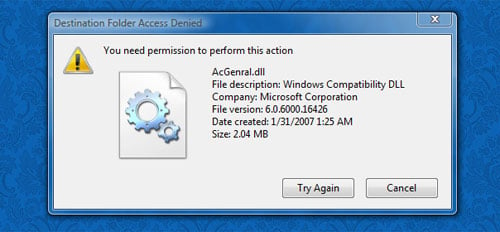
Vista Warning

For this example, I’ll be giving my user account full read/write permissions for a random file. Again, this is just an example and I have no idea why you would ever need full read/write permissions for such a random file. The point is to show you how to overcome a “you need permission to perform this action” situation if you ever find yourself in it. Bookmark the page as you might need it down the road.

  1. Right-click the file and select Properties.
  2. Click on the Security tab.
  3. Click Advanced in the lower right.
  4. In the Advanced Security Settings window that pops up, click on the Owner tab.
  5. Click Edit.
  6. Click Other users or groups.
  7. Click Advanced in the lower left corner.
  8. Click Find Now.
  9. Scroll through the results and double-click on your current user account.
  10. Click OK to all of the remaining windows except the first Properties window.
  11. Select your user account from the list up top and click Edit.
  12. Select your user account from the list up top again and then in the pane below, check Full control under Allow, or as much control as you need.
  13. You’ll get a security warning, click Yes.
  14. On some files that are essential to Windows, you’ll get a “Unable to save permission changes… access is denied” warning and there’s nothing that you can do about it to the best of my knowledge.
  15. Reconsider why you’re using Windows.

That’s generally how the process goes. You don’t want to be doing this too often though. Should you ever get a virus in Vista, the files thought to have been protected, which you gave your account full permissions for, could easily be destroyed - not good if that’s a critical system file. This probably also works in XP but I haven’t used XP in a while. Vista is just a lot more protective about things so you probably never had this type of situation in Vista, or at least I haven’t.

Promote this article on various sites or email to your friends:     


44 Comments

  1. This is not in XP at all, its a brand new annoyance in Vista, but as you said, it’s a security “feature.” To waste less of your time and doing this with each file, just disable the whole thing like this:

    1. Control Panel -> Administrative Tools -> System Config
    2. Continue through User Account Controls prompt
    3. Select Tools -> Scroll down and select Disable UAC
    4. Click Launch -> Reboot machine

    That will do it. Disables the UAC for Vista, making it like XP, which has no such protection “feature.” Although its probably not exactly the same thing, this seems similar to turning off “Component Control” in your Firewall, if your firewall has such a feature.

  2. I’m not sure if this is the same thing as UAC as I already had that disabled when I wrote this.

  3. The best way to go about this isn’t to set permissions on the individual file. Instead, to run the installer right-click on it and choose “Run as Administrator”, then you shouldn’t have any problems with permissions on this file.

  4. @Eric - that only works with exe files right?

  5. Right. Was the installer that couldn’t access it’s own file an msi?

    Until all of the third parties get their installers fixed there is another workaround you can do.

    Open the Command Prompt with administrator permissions - Go the the Start menu, type Command, press control-shift-enter to run it as administrator (or right-click and select Run as Administrator). If you have UAC enabled you’ll see a UAC prompt at this point.

    Then when you’re in the administrative command prompt you can navigate to the installer and run it from the command line. The installer will automatically inherit the Command Prompt’s administrative permissions.

  6. I dont have vista, but i like your new comment thingy

  7. This only worked a little. I installed AVG antivirus and a bunch of other programs in Windows XP, then upgraded to Vista. Vista was not compatible with AVG antivirus - and it also would not let me un-install the program (it was stuck), but no other virus software wold install with AVG still being present (I am in a paradox now). So I am manually removing the folder under program files, I’ve been locked out of non-essential folders and it’s very fustrating. Every time I try to delete these folders I do not have the permissions. The only workaround I found yet was to reformat the whole hard drive and do a fresh installation (which is utter nonsense). I have 3 PC’s getting ready for Vista but I have been put to a screeching halt now.

  8. I have a new PC with Vista factory installed and am using AVG without any problems. (I downloaded it from their web site to install it)

  9. Thanks for the instructions, they were very helpful. My situation was where I was trying to delete some file from an external hard disk that were written by another computer.

  10. Helpful, but you have to turn the UAC back on for stuff like firewall and printer sharing - such a pain. Any solutions? Thanks

  11. Followup on AVG - I have installed AVG 7.5 on four computers with Vista and it seems to work fine on all of them. This is the new Vista-compatible release.

  12. Has anyone figured this out yet? I need to uninstall Internet Explorer and I can’t because, like you said, it’s vital to Vista….(yeah right). Let me know if you can figure out how to uninstall it! It’s not in the program list, I “don’t have permission” to delete the file folder, and there is an error when I try to change the permissions. SO…I’m out of ideas.

  13. REMEMBER M$ is not resopnsible for all the junk “YOU” put into your box. It’s the responsibility of the manufacturers of that JUNK.

  14. The problem is with the files in the directories. They have a “deny” attribute that trumps any permissions. Remove the deny attribute and you can delete any files you want.

    Cheers!

    GO SENS GO!

  15. If you need to delete “important windows files”, or in my case, files from an old install…

    1. make sure you have ownership of the files.
    2. Change permissions so that you have full control, ensuring that you tick both check boxes on the permissions screen… “include inheritable….” and “Replace all existing….”
    3. Disable UAC…. this is up to you as it just avoids a pop-up and so not necessary.

    This should allow you to have full control and you will no longer see those annoying pop-up’s that you need permission

    I now have an extra 7GB on my drive where that old installation was!

    Hope this helps

  16. Regarding the original post, I had the problem where it said unable to save the permissions settings. However, after going through the process again noticed that somewhere along the line it will tell you that the properties box for the file needs to be closed after you take ownership of the file. When you reopen the properties box then you will be able to save your permissions changes.

  17. to fix ALL vista related problems, do this:

    1. start command prompt
    2. type “format c:”, hit enter

    vista will run a lot smoother after that ;)

  18. Whoot, fixed my problem exactly. I was trying to delete old AVG files from a previous install and it wouldnt delete them. This fixed it.

  19. I am attempting to remove a file on my local raid5 array (setup on this machine originally for storage while using vista.) the properties box says ‘unable to display current owner’ and when attempting to change owners the error is “Unable to set new owner on ‘filename.vob’” Access is denied.

    I’m going to attempt to workaround this by disabling UAC and probably returning to XP if these issues keep coming up. I’ve been using Vista ultimate since its release without many day-to-day issues but latley it seems like one thing after another -.-

  20. Hi folks,
    First off, can I apologise for being the most complete novice there is on pc savvy. Having said that, here’s my problem. I now have several files that I can’t delete after having d/loaded them from a torrent site. It’s giving me the same ‘permission needed’ message mentioned above. I’ve followed all the steps above, but the tick boxes are greyed-out and unchangeable. They do seem to be saying that I have permission anyway, however when I try to delete, the files still refuse to budge. I found this page by Googling the problem. I’m using Vista and would appreciate any help you folks can give a clueless soul like myself.

    Thanks in Advance.

  21. How do I get file Read and Write permission using Vista.

  22. Hi,

    When trying to install a network printer, I get an error message, “You do not have sufficient rights to perform this operation”. None of the suggestions above help me as I don’t have a file to change the permissions on. Can anyone help?

    Thank you,

    Dave

  23. if you have a bunch of files to process, you may want to use the command-line approach:

    1) take ownership of a group of files:
    takeown /f *.jpg

    2) change permissions to what you need:
    icacls *.jpg /grant Everyone:(F)

    Et voilà!

  24. What a stupid lame annoying feature of vista. This is exactly the reason why i run ubuntu and xp instead of vista on all my personal machines.

  25. Ok people why didnt most of you pay attention to the Original post -
    The exact scenario is this:

    You switched off UAC
    You got 10000 files in drive F: - yes !? in 280 directories - OK?
    now you set the file permissions for the root of drive F and give yourself permissions that over-ride all previous inherited permissions and extend to files and folders below the root directory. so first of all you take ownership
    then you set your files and folders permissions to “full” then when you are certain youre the owner and that your permissions were set on all files and directories below root on drive F - you go down the folder tree to
    lets say programs\security\antivirus\myav.exe - go to execute tha mother******** @$!*&”((*% thing and it tells you you dont have permission -

    so you gotta set all the permissions on individual files and folders - its absolutely STUPID !!!

    I am in charge of assessing vista for a company that was seeking to install it on 600 desktops but with such annoyances as this it hardly seems worth it when the wait for the real operating system (windows 7 ) will be over in 2009 or 2010 - with such stupidity built into Vista I can only recommend people stick to XP for business desktops because mission critical stuff will fail on vista unless you have tested it thouroughly for 4 or 5 months and ironed out the probs

  26. I’m trying to delete a .dll but it still wont let me but it slightly deviates from what you said at first because after i check full control i recieve no security warning is this becuase my UAC is turned off or am i doing something wrong?

    Luke Ashley Cloudsdale on Feb 24th, 2008 at 5:07 pm
  27. i was having problems deleting a file on my computer. i tried changing the permissions and the ownership but that didn’t help. it still told me to get permission. i even disabled the UAC but to no avail. i finally removed the users and group with access to the file except for the adminstrator. and it worked!

  28. “Reconsider why you’re using Windows”
    HAHAHAHAHAHA!!! Sorry, but I thought that was hilarious.

  29. Just type in cmd: takeown /f c:\path to your folder or file /r /d y

  30. The instructions in this post work great. In fact, it helped me just last week.

    However…

    I am trying to delete a BUNCH of scattered folders and files (which I isolated via windows search). It would take me 3 weeks to apply this process to each individual file (as vista won’t let you do this in batch).

    For anyone wondering, I am trying to build an image for a new machine, and need to get rid of all the hardware specific video and raid drivers (inf files mostly).

    This is a bear.

    But if you are one of the lucky few who don’t have many files to contend with, the solution above definitely works (in fact, this is the first place I found step by step instructions on the web that actually DID work for this problem for those of us who have UAC turned off, and are in full charge of our machines, yet not really…because of microsoft….arrgh).

    Frustratin 2008 on Jun 1st, 2008 at 4:58 pm
  31. i moved to ubuntu linux after my experience with windows Vista…if you can’t even delete files and folders….needless to say, none of this crap happens in linux.

    i pity people who use Windows. they have no idea what a good OS is like.

  32. You can save the current ACLs (access control lists) to a file. You’de give full access to all the files on a drive and delete the ones you found. Once you’re done, you restore the ACLs of the files and folders left behind.

    One little gotcha is if the restore tool bails on you when it reaches files that are no longer there. It should just skip them, but some programmers are newbies!

  33. Jonas R. You rock! Thank-you for freeing our photos from our XP-Vista nightmare.

  34. Help I am losing my mind. I got a new Blackbird with Vista (no choice on the Vista). Imported all my Outlook Express mail. Problems with Vista. Sent computer back. They reinstalled OS but now I am unable to get “permission” to reinstall my Windows Mail files. I’ve tried all the tricks above but it still won’t let me. The Windows Mail file folder says read only and no matter what I do I can’t get rid of it. I have years of email in there. Bista really sucks

  35. No need to take ownership or whatever, here’s the fix and I threw it on my site.

    http://www.super-crush.com/article.php/2008062104431822

  36. what i’ve noticed as an IT is that most people are having the big problem because with a standard Vista install you don’t actually get full admin rights the only way to do so is to actually activate the Administrator account which by default is disabled to do so go to an elevated command prompt (right click and run as admin) then type: “net user administrator /active:yes” that will activate the actual admin account, to disable it do the same but replace yes with no

  37. THANKYOU. FINALLY WORKED. I HATE GETTING THAT STUPID ERROR, NOW I CAN DELETE BS FROM PROGRAM FILES. SAD THING IS I JUST FORMATTED MY COMPUTER AND IT GAVE ME THAT ERROR. IM RUNNING ON AN HP DV6000 - HOME PREMIUM. ANYWAYS, THANKS. :DDDD!!!!!!

  38. I tried your initial fix and ran into a problem.. I got an error message: ‘access denied’ when I clicked Ok on the ‘permissions for docs and setting’ window. Thus could not procedd. There was a ‘continue’ button, then an ‘access denied’. On my user name there is now a little red circle with an X in it. What to do??

  39. My Vista system went belly-up. On loading i get a message ” \windows\system32\winload.exe not present or corrupt”. Trying to repair it booting with the DVD-disk and using option “repair ‘ does not do any good as after a long while I get a message “vista can not do the repair”. Since then I have installed Vista on another harddrive so I am able to access the oryginal harddrive and didnt lost any of my data, but.. no matter what I do, I cant replace that corrupted file on the original harddrive with the good one I have on the current boot-harddrive.. I always dont have required permissions to delete that file and copy a good one in its place
    (as this is “essential” file in view of Vista even if this is not a boot drive). What a crap.. I even tried accessing that file on my Linux box and guess what.. I am able to mount that drive with no problem, but then the same file permission problem.
    The most i am able to get is “read” and “execute” permissions, but never “write”.

  40. I had the exact same problem and did the same method above and didnt work. Ended up having to download a trial version of Unlocker to remove the problematic folder.

  41. this doesn’t work if the file is on a cdrom or mounted disk image
    furthermore, i have a few files even on my hard drive that this doesn’t work for

  42. Jonas R you gave a great quick solution for me there. I needed to replace ehshell.exe, which is the Media Center launch file with my own small exe that simply fires off Media Portal. It works now! I can now hit the green button on my univeral remote and start up Media Portal! Thanks so much. :)

  1. Sparate a Vista…

    Mi ero ripromesso di scrivere sul nuovo sistema di casa Microzozz, ma alla fine non ho ancora avuto la possibilità di una prova su strada (fortunatamente…).Qui di seguito un bel po' di link relativi ad articoli che parlano di questo sistem…

  2. [...] you don’t know how to do this, http://paulstamatiou.com/2007/02/09/how-to-quickie-vista-permissions/ is sort of right, except I typed Everyone in since I didn’t want to use permissions from my [...]

Post a comment, receive Stammy points.


Send a trackback.


  • If you plan on posting code, run it through Postable first.
Copyright © 2005 - 2008 PaulStamatiou.com  Privacy Policy - Terms of Service Can't spell my name? Use PSTAM.com. Go back up ↑.