Stammy Script: RSS to Twitter using PHP
I’ve been a Twitter user for a few weeks now and have come across many tools to help with Twitter posting and integration. I have also seen several Twitter mashups that essentially do RSS to Twitter and have become rather popular. At first it might sound stupid to use Twitter for syndication instead of tried and true RSS, but simply put, Twitter users are always aware of Twitter happenings, creating a more effective syndication experience. I like to call it micro-syndication as you only have 144 characters to get your point across.
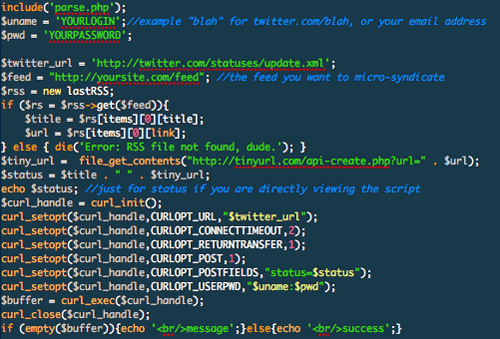
After a bit of research the best way I could find to carry out RSS to Twitter involved a Jabber bot package for Ruby. Not too many people have access to a Ruby-enabled server so I decided to make a simple PHP script to get the job done. My code might not be the most efficient way of doing this, but here’s how it works:
- A cron job accesses the PHP script as often as you like.
- Utilizing lastRSS, the script grabs the latest post from the RSS feed you specify within the file.
- The script grabs the link to the article and uses the TinyURL API to create a shortened URL.
- PHP concatenates article title and tiny url to form a Twitter status message.
- Using the login and password you provided in the file, the script uses CURL to tap into the Twitter API and update the status message.
- The script doesn’t utilize RSS caching or any logic (which would have been nice) to determine whether the post is the same as the one currently on Twitter - but thankfully Twitter is smart enough to avoid posting duplicate status messages. That way, if your cron job calls the PHP script every 15 minutes and the feed hasn’t been updated in the last day, you won’t have a Twitter account full of the same status messages.
If you don’t know how to use or setup a cron job to execute the script, you can just run the script manually whenever your feed gets updated. For example, if you have a Twitter account just for your blog notifications, just hit up the script whenever you post a new article. However, if you want to make a standalone RSS to Twitter setup, you can try to grok this article on working with cron jobs.
Download RSS to Twitter v0.1 (4 kB)
Installation
- Download, unpack and upload to a public directory on your server. Ensure the files are at a CHMOD so that your Twitter login info is safe. CHMOD 644 should be fine.
- Open tw.php and edit $uname, $pwd, $feed with your Twitter login, password and the RSS feed you want the script to access, respectively.
- Save and test it out.
Comments
RSS to Twitter, as I’m calling it, is very basic and was the result of a spur of the moment coding session. LastRSS supports feed caching so in the future it’s very possible that I could develop a version smart enough to not attempt double posting, thus saving bandwidth (although it’s rather negligible). If you have any suggestions or code you’d like to see in this, please feel free to contact me and I’ll merge it in - consider it open source.


nice. I just had to comment on your use of “dude” in the error messages. :D
I’m testing this out right now and i get the following error when navigating to the tw.php file:
Fatal error: Call to undefined function: curl_init() in /home/www/filewarehouse.awardspace.com/twitter/tw.php on line 23
What version php did you get it to work for yourself? The host I am using has version 4.4.1.
@Ryan - you need to have PHP with CURL support. I believe I had the same version of PHP (4.4) you do. I’m looking into another way without CURL.
Just looked into curl support on the server I’m using and it says that it is enabled. It also give the following info on the curl support:
libcurl/7.13.2 OpenSSL/0.9.7e zlib/1.2.2 libidn/0.5.13
I’m using AwardSpace for the hosting needs.
Hrm, the error says it can’t find curl_init() which is part of any php greater than 4
http://us2.php.net/manual/en/function.curl-init.php
not sure what to say, but ill ask around.
I did a quick switch to another free host. I think the first one had disabled curl support, but never bothered to update their faq’s about it. Now i’m getting the following output from the tw.php file when browsing directly to it:
Error
success
Is that correct now?
I believe that error is coming from TinyURL - does the URL you are trying to use have a & in it? It currently chokes on that.
This is what I have:
$tiny_url = file_get_contents(”http://tinyurl.com/api-create.php?url=” . $url);
$status = $title . ” ” . $tiny_url;
echo $status; //just for status if you are directly viewing the script
$curl_handle = curl_init();
No “&” there. Any other thoughts?
There are no “&” in the entire file. I have the version that is available through the download link above. Any other possible thoughts? I’ll also test out another host.
Ryan - I meant if the URL you are trying to run through TinyURL has an & in it.
Thanks, Paul, for all your help. It turns out it was the site rss url that was the problem. It was all fixed up by “laundering” the rss feed through a yahoo pipe and using the pipe url in the tw.php file. It rocks!
Very cool! I DO seem to be getting some repeats, though… are you sure twitter protects against them?
http://twitter.com/dirtygreek
I’ve made a change to the parse.php script to use lastRSS’s cache feature. It checks the current rss feed against its cache and only attempts to post to twitter if there is a change. I THINK it’s working correctly.
in the tw.php script, you need to add
$rss->cache_dir = ‘./rsscache’;
$rss->cache_time = 3600; // one hour
but be sure to set the cache_dir variable to your own cache directory, and chmod that directory so that it’s writable from the script. Info on this is available on the lastrss website.
In parse.php, I basically replaced
if ($timedif cache_time) {
// cached file is fresh enough, return cached array
$result = unserialize(join(”, file($cache_file)));
// set ‘cached’ to 1 only if cached file is correct
if ($result) $result['cached'] = 1;
}
with
if ($timedif cache_time) {
// cached file is fresh enough, return cached array
$result = unserialize(join(”, file($cache_file)));
$result2 = $this->Parse($rss_url);
if(count(array_diff($result,$result2))
My comments apparently got cut off, so just email me if you are interested. george at dirtygreek dot org.
Hi, great work! I can’t get it to work though. I keep getting the RSS file not found message. I have tried different feeds and none seem to work. Ideas on what I am doing wrong?
I’ve done some more fun stuff using (at least partially) Paul’s code and methods, but for some reason I had to use patRSS instead of lastRSS. Anyway,
http://www.dirtygreek.org/journal/journalId/2042
What this script does is read a Google Calendar feed and check each event’s time against the current time. If the event’s time falls within a given span around the current time (default is one hour), it will post the event’s details to Twitter. In other words, Google Calendar will tell Twitter what you’re doing at the current time.
I keep getting the “Error: RSS file not found, dude.” error, even though the RSS file does exist - I’m linking directly to it, and have checked it by going directly to the rss file in a browser and getting the expected xml page. Any ideas why I’d be getting this error?
Thanks in advance for any help!
Cool script. One problem though - occasionally hiccups and sends the error message to Twitter, which is obviously not ideal. (ie [twittername]: Error)
Nice script, thx a lot! It works just fine on my integration of Twitter and Plazes: http://dlinsin.blogspot.com/2007/06/twittering-with-plazes.html
Regards, David
Looks like something changed on Twitter. After 2 months - suddenly at midnight I have been getting duplicate posts of the latest status message every time the script runs. Any thoughts?
Hey guys,
I implemented a simple check to prevent multiple updates, check it out if your are interested:
http://dlinsin.blogspot.com/2007/06/twittering-with-plazes-fix.html
@Damon, I’ll have to check that out. I haven’t messed with the script in quite a while due to other obligations.
It worked for a few days, but with nothing changes I only get ‘Disallowed Key characters’ as output. Can anyone give a hint what’s going wrong?
The script seems to have some problems: it doesn’t cut the username at the beginnig of the message and it doesn’t update the twits regularly.
Have you got some ideas in particularly for the second problem?
I’ve tried this script and I’ve noticed that Twitter doesn’t check for duplicated posts like you have said.
Is it need to activate any option?
Thanks for the script. It worked like a charm for me @campascca
Appreciate you sharing this with all of us!
Dreamhost (and others) doesn’t allow @fopen with external urls - I’ve modified parse.php to use curl instead to get the rss file - email me if you’d like a copy.
(I will also let LastRS known and share the modifications back to them if they want them)
hello,
i tried this on my blog, but it wont send notification to twitter unless i go to http://www.myblog.com/tw.php then it tells me success and i receive the message.
this is the normal thing to do? or is there any problem?
thank you.
Is there another choice for CHMOD? My CronJob seems to want something that allows executable (ie, 775)
Nice script. I gonna use it on my blog to automaticcaly send new articles to twitter.
This is great - and perfect for the site I’m building. Thanks!
Hello Paul, there is a small and easy-to-use PHP library for sending messages to Twitter and receiving status updates - http://phpfashion.com/twitter-for-php
Thanks for the link Jeff - Unfortunately it relies upon php5/simplexml which not many people have on their servers. I love simplexml though, much easier to work with http://paulstamatiou.com/2007/04/17/how-to-parse-xml-with-php5