Twitter: making a run to staples to get batteries for my keyboard and a box to return the 2 books [...]

Review: Logitech MX Revolution Mouse

Oct 21, 2006 in , ,

Logitech has always had a strong presence in the high-performance mouse market. They were the first to have a virtually lag free cordless mouse (MX700), the first large company to produce a cordless laser mouse (MX1000), and now the trend continues. Logitech has recently created what they have dubbed as the world’s most advanced mouse. Today I will be checking out the MX Revolution to see if it lives up to that epithet.

MX Revolution

The MX Revolution will be replacing my recent wireless Mighty Mouse purchase for one reason; scrolling. After moderate use, the Mighty Mouse’s scroll ball becomes dirty and will not scroll at all. Short of disassembling the Mighty Mouse, cleaning it is impossible regardless of the Apple doc page suggesting rubbing the scroll ball upside down. On the other hand the MX Revolution utterly excels at scrolling, as you’ll soon find out.

Specs

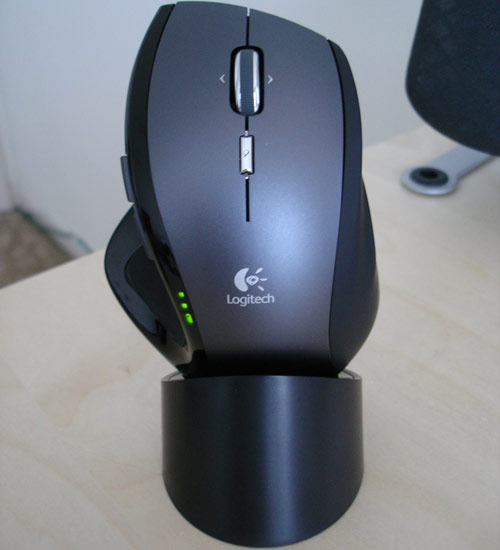
The MX Revolution is a right-handed mouse with 7 buttons not including the “quick-flip” wheel on the left and the main scroll wheel on top. It comes with a charging base and a separate, bus-powered USB stick which acts as a 2.4GHz RF transceiver. The MX Revolution is powered by a rechargeable, non-replaceable Li-ion battery. This mouse utilizes a precise Class 1 848nm performance laser similar to those found on the Logitech “G” gaming series of mice.

MX Revolution
The MX Revolution has a smaller, well-designed charging dock compared to the MX1000’s base.

However, the best feature of the mouse lies in what Logitech calls SmartShift technology. Depending on how you setup the options in software, the main scroll wheel has two modes - the regular “ratchet” mode and an uninhibited free spin mode. For example, in the Logitech software (which is available for Windows XP, Vista and as a universal binary for OS X) I have it set to use the clicky ratchet mode until I scroll fast enough, at which point the scroll wheel goes into free spin mode. Free spin is by far the coolest aspect of this hyper-fast scroll wheel as Logitech calls it.


Ryan Block from Engadget comments on the MX Revolution. Clip cut from ScobleShow with permission from Robert Scoble.

Ergonomics

Logitech has always been known for producing well-fitting, comfortable mice and the MX Revolution is definitely no exception. There is a rubber-clad thumbrest area with the document quick-flip wheel and 2 additional buttons within reach. The quick-flip wheel is like a spring-loaded scroll wheel that only goes forward or backward a bit. Logitech wants you to access the Alt+Tab/Apple+Tab interface with the quick-flip but I have found it equally handy just as a scroll device.
MX Revolution
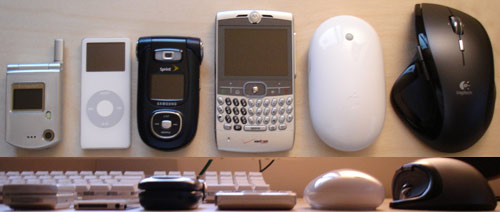
Left to Right: Pantech C300, iPod Nano, Samsung A-920, Motorola Q, Apple wireless Mighty Mouse, MX Revolution.
MX Revolution

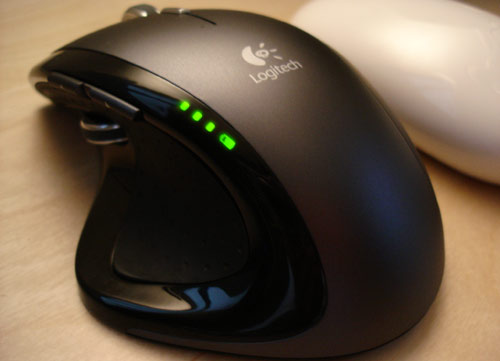
Compared to other cordless laser mice, I don’t find the MX Revolution too different in terms of weight. I actually couldn’t decide which was heavier - the MX Revolution or the Apple wireless Mighty Mouse with its lithium batteries. I double-checked with Chris and we seem to believe the Mighty Mouse is actually heavier. Moving on, Logitech has generously fitted the underside of the mouse with 4 teflon pads making it glide-happy on most surfaces.

Software

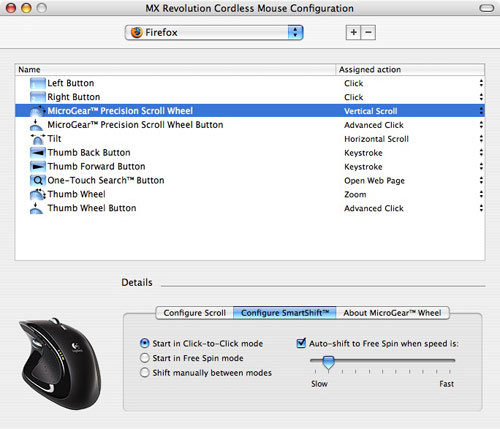
I can’t comment on Logitech’s SetPoint software for the PC, but the Logitech Control Center for Mac users is very powerful. Users can pair each button with an action, either for global settings or by application. Buttons can be routed to actions such as click, advanced click where a keystroke can be added to the click, keystroke, cruise, switch application, open web page and many more. All in all, there was nothing I couldn’t get the software to do. I have the scroll button act as a middle click so I can open bookmarks in tabs (I had to use advanced click with Command), I have one-touch search open my homepage while in Firefox and open a QuickSilver prompt while on the desktop.
MX Revolution Software

If you have specific settings for various applications, the software will detect this and change button mappings on the fly or at least that’s what it should do. There are times when it gets confused and defaults to global settings even though Firefox was the selected application. In cases like this, just switch to something else and then go back to your current app. That usually fixes it. Meanwhile, PC users that demand even more control over SetPoint might want to give uberOptions a try.

Worth It?

The MX Revolution can be found online for around $90 USD. The price is definitely on the steep side for a mouse but some people can justify the cost. The MX Revolution has many buttons, capable software for using those buttons how you like, a sturdy, comfortable feel, a small, portable USB transceiver and stellar battery life. I don’t think I touched on the battery life, but the MX Revolution is great at conserving power. With a full charge, the MX Revolution lasted me 3-4 days with moderate use. If you have ever used a Logitech G7 mouse, the MX Revolution’s battery life outpaces it incredibly.

MX Revolution

I think this mouse was a good investment and will let me tame my 24-inch display all the better. The MX Revolution might even be a Photoshopper’s dream peripheral by mapping the many buttons to create new documents, cycle through history, etcetera. That being said, this mouse probably isn’t worth it if you only check email, talk on AIM and browse the web. Do you think this mouse is right for you? Let me know.

Promote this article on various sites or email to your friends:     


58 Comments

  1. I’m perfectly fine with my Logitech Trackball (also called a Marble Mouse). Though, if I wanted a traditional mouse, I would totally go for one of these. As in, steal it, because I can’t afford it!

  2. I’ve always shied away from wireless mice, namely because I use it for a lot of gaming. I haven’t looked at any cordless’ recently (read: a few years), and from the sounds of it the technology’s much improved. I’d still prefer a G5 though.

  3. Yeah I’ve got a G5 back at home but I don’t like how it doesn’t have 2 buttons on the side for forward/backward.. it only has one.

  4. I’ve been a long time MX1000 user but this thing just looks awesome. I don’t think I’ll be trading in either of my MX1000s (home and work) but it’s nice to see Logitech is keeping the bar raised.

  5. After my MX1000 recently crapped out on me (I bought it in July ‘05), I’m in the market for a mouse. I was holding off from purchasing a Mighty Mouse due to the dirty ball problem (minds out of the gutter, please). This is a great review. Thanks for explaning the ratchet/smooth function as I was pretty confused by it when I first heard of this mouse. I’m glad to see that Logitech is keeping on top of things.

  6. nice mouse, i’d like to buy it.
    to those of you bashing the mighty mouse, i bought one a year ago, i still use it and its in perfect condition.

  7. Ahh, they’ve fixed my only issue with my MX1000. I have a V400 notebook mouse too, with the little USB transceiver, and that attachment to the cradle was the only thing I disliked about the MX1000. Oh well, time to trade up!

  8. I just got a mx1000 laser mouse and it’s pretty good overall, but to be honest I’m still having trouble justifying going from an optical to a laser mouse. I have noticed almost no difference in performance when using the laser on a variety of surfaces. The only things I have noticed are less range, and shorter battery lifeon the mx1000.

    Now I know I’m talking about the mx1000 here and not the revolution but as you mentioned, you get around 3-4 days on moderate usage with the revolution, with my logitech mediaplay mouse however, I have gotten in the range of 2-3 months on moderate to high usage with 2AA batteries.

  9. The MX revolution looks awesome, but I could not imagine ever needing all the features, or dropping that kind of money on a mouse…unless of course i was a hardcore gamer.

    Does this mean you have a mighty mouse for sale?

  10. Ergh. Now I’m thinking the mouse looks kind of big. I was just starting to get all my gadgets nice and small. Adding this to the collection would be against the “rules”. I’ll give it a fair week before deciding whether it’s a keeper.

  11. This mouse looks awesome! I’ve really never ventured beyond a 3-button scroll mouse, mainly due to the fact that I abuse them and with that being said, the cost of a mouse like this is a little high. (Of course, if this mouse were THAT good, I might be convinced! It’s nice to have all the extra functionality (and that sweet scrolling).

    Anyway, as for your Mighty Mouse, check this out: http://blog.smalldog.com/article/408/apple-mighty-mouse-woes

    Later
    MJ

  12. Yeah, I got one of these on Friday night and love it so far. Nice review.

  13. I have to go for the Logitech G7 with it’s quick swap battery.

  14. Yeah but each G7 battery lasts only 6-8 hours (with my crazy usage at least). I had a G7 but returned it and went for the G5 b/c of the G7’s poor battery life.

  15. I picked one of these (MX Revolution) up a couple weeks ago and think I may now be ruined for other mice! It’s comfortable, powerful, and an all-around great tool. Yeah, it was pricey but considering how much time I spend between work and play, with a mouse in my hand, I consider it a worthwhile investment.
    BTW - I originally bought the MX-1000 but after a week decided to take it back and pay a bit more for the MX Revolution. I’m glad I did. The 1000’s thumb buttons were problematic (I kept accidentally bumping them) and the overall weight/feel/comfort of the Revolution is more than worth the extra ~$20 I had to fork out.
    My only complaint so far has been that the software doesn’t allow enough customization. With any luck, that will be remedied by the suggested UberOptions, above. Thanks for the tip Paul!

  16. Just to follow up on the above comment: The UberOptions utility is the bomb and exactly what was missing.
    MX Revolution + UberOptions = the ultimate mousing experience (IMHO)

  17. Sure, but changing the battery on the G7 takes maybe 5 seconds (and I’ve even done it one handed while mid combat in WoW). Sure, the batteries on my old MX900 lasted longer (maybe 3-4 days of heavy use), but if it died mid use, it was out of commission while I recharged. I had to keep a corded USB mouse around just as a backup.

    I would probably feel differently if it was my only mouse and I used it 8-12 or more hours a day. As it is, it is my home mouse and gets 4-6 hours of use daily, so it lasts a couple of days anyway.

  18. I don’t understand why you would want a 6-8 hour battery (x2 = 12-16) when you could have a battery that lasts 3-4 days. You have a battery level indicator so you know when to charge; just let it charge overnight.

  19. How do you get the side wheel to do something other than switch apps? I have the MX Revolution as well, and it’s kind of annoying that it doesn’t allow any useful functionality for the side wheel

  20. @moksha - I have mine set to “zoom” which acts as a scroll.

  21. Can the MX Rev side wheel be programmed to start Expose (F9) or Dashboard (F12) like you can with the MX1000?

    Ideally, the scroll wheel button would be bring up Expose and the side wheel Dashboard.

  22. Hi all,

    this mouse sounds a good contender for my upcoming imac 24. Wodering which keyboard everyone recommends as a good match? Disappointed to see that the Logitech® diNovo Edge doesn’t support Mac.

    Tks Craig

  23. I’m co-editing a film in Final Cut HD on a Power Mac G5 with another person who loves the Mighty Mouse for its horizontal scrolling capability. I’m using a twin monitor setup, 17″ & 23″. I don’t care for the Mighty Mouse, but do appreciate the horizontal scroll capability. Is this mouse’s horizontal scroll capability better than or at least equal to the Mighty’s?

    Let me know, and thanks.

  24. @SteveM - horizontal scroll is alright on the MX Revolution. It’s just a left/right notch action so the speed of it depends on how you set it up in software. With that, I think the Mighty Mouse is better in that you aren’t hardware limited in side-scrolling. However with the Mighty Mouse you will keep having to move your finger back and forth over it. Also, the Mighty Mouse is NOTORIOUS for the scroll ball quickly becoming dirty and hindering all scroll functions. That’s why I have an MX Revolution now.

  25. Craig. I use it with the default wired Apple Keyboard. I really like that keyboard.

    And as for the range. If you attach the reciever to the keyboard, it’s even better. I’ve never had range problems with the Laser mice..

    Earlier I had the MX1000 which I recharged once every forthnight or such.. The Revolution looks to have the same or better capacity. Nice.

    That is.. I havn’t had to recharge it yet, I’m still running on the little power that was in the battery on delivery - 3 days so far :-)

    Okay - I code more than I play, but I don’t feel any lag when I play. Neither did I with the MX1000, anyway.

  26. Looool am just looking the pag with mx revolution :D xD hahhah hilarious

  27. The most disturbing thing is the replacement of the middle-click. Pushing the scroll wheel manually switches between ‘ratchet’-mode and free spin. This cannot be changed in Logitech’s Setpoint software, not even with uberOptions. Setting the middle-click to the ’search’-button below can do the trick but requires a little getting used to. It’s all worth the ‘free spin’ though. Browsing with the ratchet just feels clumsy after you’ve tried the new mode.

    Get uberOptions for the SetPoint software and this mouse becomes really good. The original software is very limited.
    And be sure to get a good mouse pad. Though the pads underneath the mouse are supposed to be teflon, they felt like 2-year-old plastic pads right out of the box. Investing another 20 EUR (25$) in a good combination of mouse pad and gliding pads is almost a necessity for this rat.

    Is it worth 90 US$ or 70 EUR? Hmm, tough question. I would have bought it for 50 EUR myself but got it as a christmas present. Now that I have it, I would not ever give it back, though.

  28. I just bought the MX Revolution and am using it with a MacBook Pro. I can’t seem to find a setting that allows me to keep the MacBook trackpad and buttons active at the same time as using the mouse.

  29. Paul. the trackpad isn’t very useful anyway :-)

  30. i made three long charges atthe start but now the battery lasts only for 6-7 days what is the problem?Then i tried with the battery indicator showing it is full taking off- still 6-7 days tried to load it for 2 days- still 6-7 days!!! can any1 please help me????

  31. 6-7 days for it is normal? But in the store they said that it lasts about half a month.

  32. @wargunnerguy - Haha, who told you that??

  33. I just recently purchased the MX Revolution, and absolutely love it. I have been browsing through different reviews of the mouse so I can find out if anyone has been having any issues with the mouse. It also gives me an excuse to use the uber-cool free-wheeling scroll mode. ;-)

  34. who told me that? you did..but how long is it supposed to last?

  35. I’ve had an MX1000 for almost a year and a half now and I’ve been impressed by it. It took a few weeks to get used to it as far as ergonomics goes, but I don’t think I could go back to my old trusty M$ 5-button optical for very long periods of usage anytime soon.

    Someone mentioned above about wireless mice and gaming being sub-par. I was originally under the same impressions being that the wireless mice I had seen were laggy and harsh on the battery life. Since I received my MX1000 I’ve left those misconceptions behind without looking back.

    I’m somewhat interested in trying out the revolution, but that means I have to talk one of my friends into getting one and then stealing it from them in the night –ninjastyle.

  36. At what dpi is the mouse operating?Is it any good for gaming?

  37. Feroz Kahn, it’s oprerting a 800 dpi, but if you ask any hardcore gamers, then no wireless mouse is good enough for gaming.

    They don’t know what they’re missing.

    I’m no league-player, so for my gaming use it’s absolutely perfect.

    Bjarke Sørensen on May 19th, 2007 at 10:35 am
  38. I had the pleasure of having Logitech send me a Logitech MX Revolution to review, and now at work I curse the fact that I only have one. Its one of those things that once you start to use it, the bar that is your computer experience rises. The closest comparison is dual monitors vs a single monitor. The scroll wheel is my favorite feature especially for web development, or even should the need arise scroll through 3000+ emails in Outlook with a single flick of your wrist. Its sexy and functional, what else can you ask for in a mouse?

  39. Three months ago the Rev became my first ever Logitech purchase. This is a superb piece of equipment (although I’m not quite as enamoured with the diNovo keyboard). Only minor gripe is that it sometimes temporarily loses connection with the receiver when the mouse pointer is in corners of the screen; rectified this with a USB hub which brought the receiver out from the back of the PC.

  40. I bought this mouse yesterday. Amazing mouse. Very good grip and so on. I hadn’t tried it in photoshop (because i hadn’t time ;/) but i think, that it will be good photoshop friend :)

    [Sorry for poor english..]

  41. Well PSTAM, another review left a good impression. Luckily TigerDirect has 20 dollar rebates on both the VX revolution and MX revolution mice. Hopefully the VX lives up to 1/2 of your claims for the MX!

    Thanks,
    Derek

  42. I have a love/hate relationship with my Revolution. When its working, its the best mouse I’ve ever used. The problem is that Logitech’s Mac drivers are buggy.

    Do any of you Revolution owners experience the issue where the Revolution becomes usable when an external HD is connected, especially during a transfer?

    Whenever I transfer stuff to the external, be it Firewire or wireless via the airport, the Revolution becomes unusable. It locks up, can’t move, can’t click, etc… when the transfer is done or canceled, boom, works again. Super annoying.

    Also, it tends to lose its preferences every once in a while.

  43. Can this be used using the inbuilt Bluetooth of the MacBook or do you have to use the USB dongle?

    Thanks

  44. @Slip: The MX Rev doesn’t use BlueTooth - it uses FastRF, so you must use the included USB stick.

  45. paul, what’s your take on the mx revolution with leopard? also, as some other commenters have mentioned, logitech’s software seems pretty buggy, and as seen on other sites, it’s especially buggy with leopard. are you still *happily* using the mx revolution now that you have leopard installed? i’m currently wanting to switch for an ms mouse/keyboard setup to an aluminum apple keyboard and logitech mx revolution, but my main problem is with mouse setup stuff.. i know there is steermouse, controllermate, usb overdrive that can take care of the button assignments, but what about the scroll wheel auto changing/sensing as well as the tracking of the mouse settings.. or is the logitech software *good enough* in leopard?

    thanks and awesome website, been a great help with stuff.. wish i had held out on my mbp until the sr version came out; the better video card and led backlit lcd and total ram bump woulda made it worth waiting an extra 6 mos. :/ ahh well.

  46. seth: you will always get more value if you wait. You can argue that it’s worth the wait, but six months later there will be yet another new thing.. :-) While we’re at it.. I heard a new MBP is coming soon. January-ish.. ? Maybe I should upgrade the G4..

    As for the MX and Logitech’s drivers.I stopped using them - I just use the features that’s supported by the OS. I might be missing out on some things, but that alone makes the mouse good still.

  47. i play alot of FPS’s and world of warcraft in a black temple raiding guild, being able to bind more actions to my mouse is awesome, less reaching for keys on the keyboard or clicking buttons on the screen.

    plus this mouse is dead sexy, best looking, and comfortable mouse ever made.

  48. Iv’e had the mouse for about a year. I bought it for work and love it. when I have to use another computer, I can’t stand using a different mouse. Plus, I’m a gamer, and we game on at the shop after work, not Pac Man eather, but Unreal Tournament III, Battle Field 2, and the mouse works outstanding.
    ONLY ONE ISSUE, now forgive me, I didn’t read Everything above me, but will soon. The wheel is slowing down. When you spin it, its now stopping quick. It needs to be cleaned………
    Any clues how to do so?

  49. I believe you left something very important out of this review. The one major flaw in this mouse is the software. The current software is setpoint 4.0, and it simply doesnt give you enough customization.
    UberOptions is a freeware aftermarket program that gives you 30 more options for button configuration/speed. With setpoint 4.0, you can only open .exe files. For some people this is fine, but for people who want hardware to do what you want it to, its not.
    Uberoptions gives you the ability to set the hardbuttons to open shortcuts or batch files.
    Perfect for people who have set their WMP11 shortcut to open in the ‘Now Playing’ menu instead of the default (worthless) ‘Library’.

  50. It’s not that expensive if you shop right. I got it for $75 at Buy.com yesterday, but it will cost me $30 in the end. There’s a $20 rebate from Logitech, but I also used a $25 Google Checkout discount…..Free standard shipping had it waiting at my front door today. :)

    A note to Mac users: Logitech Control Center, which you have to download from their site (CD is PC Only, which I find oddly offensive) does NOT always work. I can’t get it to work on my 24″ iMac, so I personally use Steermouse which has been a godsend. A search of the Logitech Forums shows LCC’s inability to recognize various “supported” mice has been a revision-spanning problem. I couldn’t get it to work with my VX Revolution notebook mouse either (another nice product, btw). My only problem using Steermouse is that I can’t figure how to allow it to switch between scrolling modes; it’s stuck on the “click” method.

    I’ve bought three DiNovo setups (Original Bluetooth, USB/Laptop edition and the Edge) and I’m still waiting for Logitech to provide drivers for the Mac. Mac users are known to shell out money for good design and our user base is growing. WAKE UP!!!! Thank goodness for third party support, but one shouldn’t have to resort to it.

  51. After about 6 months, the free-scroll mode is sluggish. The mouse needs a cleaning and yet Logitech claims that opening the mouse voids the warrantee. So they’re shipping me out a replacement! How bizarre. When the mouse goes out of warrantee and I break it trying to open it, I am definitely not buying another. Truly sad because I love the rest of it.

  52. my mouse is revolution

  53. This mouse is a dream come true, but has one fatal flaw that will make be bring it back to Best Buy. It runs on a 2.4 GHz RF signal, which happens to be the same a a wifi network. You can’t claim to be the world’s most advanced mouse when the designers failed to factor in one of the most common forms of interference that might come up around a computer. The signals interfere, and the mouse cuts out for seconds at a time every couple minutes. I love everything about this mouse, but that’s not a drawback I’m willing to live with. I would have loved a wireless mouse, but at least I’ll be getting some money back when I exchange for something wired.

  1. [...] If you would like to read about the other mouse in the Revolution family, check out Paul Stamatiou’s review. [...]

  2. [...] Expensive laser mice seem to be all the rave among the blogosphere lately, Logitech’s MX Revolution has been a big hit as well as the VX Revolution. Spending big money on mice has never been my thing, but I have needed a nice mouse for my MacBook Pro for quite some time. [...]

  3. [...] The Logitech MX Revolution has gotten a few good reviews and it looks great. At $145 it’s a tough decision. [...]

  4. [...] Asides The MX Revolution is mine!Breastfeeding woman kicked off flightJustkez gets a sideblogInnocent smoothies get winter hats [...]

  5. [...] past week I decided to join great bloggers like Paul Stamatiou, Derek Punsalan, Alex King, Glenn Wosley, Matt Brett, and James Mathias and purchased myself [...]

Post a comment, receive Stammy points.


Send a trackback.


  • If you plan on posting code, run it through Postable first.
Copyright © 2005 - 2008 PaulStamatiou.com  Privacy Policy - Terms of Service Can't spell my name? Use PSTAM.com. Go back up ↑.