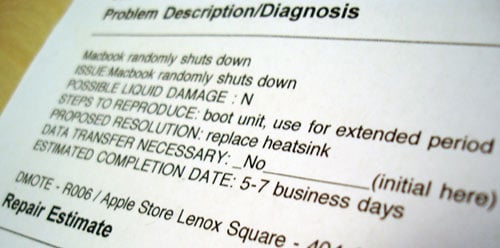
Yay, My MacBook Randomly Shuts Down
After hearing numerous reports about a problem with early “Rev A” MacBooks shutting down, I was comforted by the fact that I had not experienced this problem. Unfortunately for me, my MacBook exhibited its first signs of RSD (Random ShutDowns), also known as RSS (Random Shutdown Syndrome, not to be confused with Really Simple Syndication), yesterday morning.
If I’m not letting the MacBook do anything overnight, I usually put it to sleep when I head off to sleep. However, 3 minutes into having woken up the MacBook, it just turned off. It took several boots to get it to the desktop again, as it kept shutting down on its own. Fortunately, it seems like I can avoid this completely by not letting it sleep. I thought the case might have had something to do with load, but encoding an MPEG file to DivX proved that theory wrong.
So I trekked out to the Apple store yesterday, got an appointment at the Genius bar and then came back an hour later. Luckily, the Genius helping me out was “in the know” and knew about this problem right off the bat. He ordered a new heatsink and told me to come back when they call me. He wasn’t sure why, but he said that whenever they replace the heatsink it fixes everything. Maybe this is a valid explanation. Everything seems like it will be taken care of from warranty, as I don’t have AppleCare or ProCare.

As far as other MacBook problems are concerned, my early white MacBook exhibited signs of discoloration. I let the Apple Genius know about this and he also ordered the “top case housing with keyboard” which runs $101.56 but is covered under warranty (since Apple claimed this as a defect in the plastic a while back).


This is not good. Everyone I know with MacBooks are running into this issue. It looks like I might be next. :-( I have had one RSD about a month ago, and hoping that was just a fluke with overheating or something. I’m just getting really paranoid.
So far my MacBook has remained mostly a desktop machine. It spends most of its time docked, but that’s about to change. Tomorrow school starts and I’m going to be using it more as a laptop. Something is telling me that I’ve been fortunate since my unit has remained stationary most of the time. I just hope the RSDs don’t start when I really need the system.
Hmm, I just thought of something. You mentioned about sleep. I never have my MacBook sleep or even off. It’s on 24/7, and is constantly pumping out heat. When my MacBook did a RSD last month, it was while I was at camp. That week I was letting my machine sleep and turned it off every once in a while. This is leading me to believe heating/cooling the system may be part of the problem.
When I start tomorrow, my machine will be sleeping most of the time. I guess I’ll find out shortly if that’s the case.
I’m in the same boat Paul- not 24 hours after I initially read about the problem mine followed suit. If you read through the apple support forums you’ll turn up thousands of posts on the issue, unforunately there doesn’t seem to be a uniform fix, Apple replacing everything from RAM to heatsinks to the entire logic board- And worse still, in some cases, the problem comes back.
HOPEFULLY I’ll get mine back and all will be well- If not I’m going to stab a Mac Genius, not that it has anything to do with them, I just HATE that title- You’re lucky your ‘genius’ was aware of the issue, mine was a total asshat.
I haven’t had that happen to me once, since I bought my MacBook in May of this year.
I sleep it every night and wake it up in the morning, no matter what - it goes all over the house, doing all sorts of tasks and no problems.
Just hope it doesn’t happen to me either seeing as on Wednesday I start Junior year of high school where I have a feeling I’ll be using this for a lot more productive work ;).
man I am glade i bought a PRO and not a regular. Nock on wood that my pro stays in good shape.
then again the early Pro’s had their problems too.. “the whine”
I read this the other day.
http://maba.wordpress.com/2006/09/01/macbook-shutdown-solved-at-last-hopefully/
The shutdown issue seems to be caused, at least in some instances, by the heatpipe/sink expanding.
Yeah I linked to that in the “valid explanation” thing, I bet that’s likely it. I had read that yesterday before going to the Apple store and I told the guy that the heatsink thing might be the possible issue… he seemed to agree.
I’ve had my Macbook since early July and I haven’t had any discoloration or random shut down problems so far — hopefully I won’t run into those problems, either. How long did you have your Macbook before it starting randomly shutting down?
I bought my MacBook on June 8th.
haha, you damn bot, you replied like half a second after I posted my comment.
Anyway, so it looks like there’s a chance that my computer could have this problem in the future… I better treat my MacBook extra nice or something.
I’m buying mine in the next week and I really don’t want this to happen. Let’s hope it’s fixed up by then. Other than this problem, how are you finding the Macbook Paul?
I shipped my MacBook in for RSD repair. They replaced the heatsink and a couple of other components (total turnaround time from phone call to receipt of the repaired machine was 5 days). I’ve had it back for two weeks now and it has been RSD-free, so my fingers are crossed that they have this figured out. It’s a great little machine — I’m really enjoying it.
@Tommy: I’m really liking it.
http://paulstamatiou.com/2006/06/10/first-impressions-macbook/
My Macbook had this problem but I didn’t get a replacment heatsink, I got a new logic board.
Jim,
Did the new logic board seem to fix the problem instead of a replacement heat sink?
I absolutely love my macbook. I think I picked it up the 3rd or 4th day that it was out. Everything went great for about 3 weeks, and then I started to notice little things.
First my screen enclosure popped out a little bit. Nothing big, but if you touched it or adjusted the angle it would make a little popping sound. Then the mouse made the SLIGHTEST clicking sound when you rested on it, not actually depressing it in significantly. Neither of these issues were big, but I got an applecare case opened and a box sent anyway. Now I’m having issues with bootcamp and dual booting.
Despite all of this, I still say its a great computer. I LOVE the battery life, love the isight, and the keyboard is great. The thing starts up in under 10 seconds and if photoshop was out in universal, I’m sure it would be stupid fast.
But here’s to having applecare. hear hear!
I’m having an issue with Boot Camp where at boot, a folder with a question mark appears for about a second while loading the icon for the booting OS.
It’s really annoying, and it might mean that my EFI is messed up or something.
Yes, I had this problem. Finally got it back and have had it a few days, and it looks like the problem has been fixed. However, it still has some issues that are the fault of Flextronics, the company Apple contracts out to for most of the MacBook mail-in service. I sent it in the first time and the issue was fixed, so the second time they replaced the heatsink. However, it arrived LOOSE in the box (all the foam padding broken up), and scratches all over that couldn’t have happened from shipping, so it got sent back a third time to fix their mistakes. Now I have it back, and there are still some scratches in the just replaced top cover, but I’ll take it to an Apple store to get that fixed, once I’m sure the RSS isn’t still around (since if it is, I’ve been assured Apple’s replacing the machine). I wouldn’t care about a small scratch, but I have it since first week of June and hadn’t scratched it at all.
Also, there is another problem. If you change certain settings like the display brightness, when you restart the computer, you get vertical colored lines, and to boot you have to reset the NVRAM/PRAM. Apparently its a software issue that Apple’s working on, but if it happens to you, you can make it temporarily go away by changing the display resolution to something else and then back again.
Wow that was a long post. It’s what I get for getting a rev A machine, but its covered under warranty + AppleCare, and Apple has been very good about it, even with their third-party screwing things up. Hope you don’t mind me venting, but it was nice to get it all out.
This happened to me a week ago, I called the mac guy, but he still din’t fix it. Maybe I should tell him about the heat sink.
I just had another random thought. You know that burning chemical smell I talked about? I wonder if that was the heatsink burning through the cable like that once article suggests.
Paul, Checkout this post over at CrunchGear. Looks like intel didn’t fetch any luck for Apple.
At my place this Apple folks are really dumb, I called them and suggested them about the heatsink problem and gave a reference to this post.
Hopefully they will fix my macbook.
paul you must be bad luck because no more then 5 mins after i read this mine shutdown. i’m hoping this is indeed a fluke but something tells me i’m gonna have to make an appointment soon.
as an G5 iMac rev B owner (no problems at all) it’s sad to see so many issues with apple products. two friends of mine (rev A MBP and rev A MB) both having to take their laptops in for repair.
hope you get it fixed with no issues.
Hm…Temperature woes, maybe?
Had this same problem, repeatedly. Plugged in, or unplugged. Genius’ recommended to send to Apple for Motherboard issues.
WRONG! Apple found that it turned out to be a RAM memory issue after all, you might wanna try taking out your Ram, then putting it back in.
I have a MacBook that is back for its second repair for RSD; the first time, they replaced the heat sink; this time, it looks like they’re doing the same thing. I can’t believe Apple hasn’t figured this out yet, but it seems that’s the case.
Could the RSD be caused by a small gap between the CPU and the heat sink, which narrows sufficiently when the whole thing is warm? The heating-cooling cycle could also potentially squeeze thermal compound out of that gap, allowing air (a better insulator) to prevent heat transfer when the heat sink is cold. Then, when the system is powered while cold, the CPU has a chance to overheat and shutdown before warming the heatsink enough to expand to make better contact.
My experiences suggest that high CPU load on a cold laptop result in relatively reliable failure, once the problem appears. Once everything is warm, the RSD is less frequent. Even when I was experiencing 10-15 RSD a day, once I had the thing running, it would generally stay running. (Many of those RSD are one after the other, as I’m trying to boot the computer.)
Some have suggested that the SMC fan behavior update is to blame for new appearances of the RSD problem. This seems consistent with the theory outlined above; a cooler heatsink would result in a larger air gap, which would mean CPU temperature spikes are more likely to cause thermal shutdown.
The notion that the heating-cooling cycle could gradually squeeze thermal compound out of the gap between CPU and heatsink seems like a decent explanation for why the problem takes months (or weeks) to appear (or reappear).
Maybe new heat sinks will help. But what if the surfaces of the 2 chips that the heatsink contacts aren’t coplanar? What if there are tiny but substantial variations in these surfaces, that vary from computer to computer? No single rigid heatsink part will solve the problem. It may require a retooling of the logic board production process and obviously replacement in each computer. This is something I am sure Apple would love to avoid at all costs.
Mine has been back at apple for 2 weeks now waiting on a heatsink. The CSR mentioned that there were a lot of macbooks in waiting for the same part, so there’s hope that they have found it this time.
got my black macbook may 29. i take very good care of it, put it to sleep when not working and such. just this past week or so, I began experiencing random shut downs. i don’t download much so i know its not a virus and my software is all up to date.
very upset to have learned so many macbooks are experiencing this problem. it is dreadful! sometimes its takes 10-12 restarts just to get it back on again. then I learned to hold down the power button until the sleep light flashes and that horrendous beeeeeeeeep sound goes off. that is the reset button now i guess, and it brings it back to life.
still don’t understand why we should endure this? I’ve been on the phone for hold now (let me take a look at my wasted cell phone minutes) 45:43 seconds still on hold. Should I not even bother with calling the main tech support line. Perhaps going right into the genius bar will do. what do you guys think?
Danny -
Same for me, The problem first started for me three weeks sfter purchase at the Oslo Airport in my way to Haugesund, I bought in memory ten two 1GB modules of Ram, thougth that was the problem but it did it again with the 250 Ram modules as well. It won’t reboot untill you let the power button pressed untill you hear the beep. Now the display puts everithing in 16 palete colors and won’t allow more than 250 at any resoluton and won’t detect an ethernet conection in tiger but it will in windows. Worst thing is that now I am running a brand new Mac Book with windows all the time!!! I am back home but I have to trevel to Norway this weekend again and the service senter tells me it will take about 15 to 20 days to fix it, I have to take it as it is… I am really not happy with this mac, I liked my old ibook much better.
I have a black macbook week 21. My first Mac. I was used to weirdness with my pc so I didn’t think it was a problem at first. First thing was it went all grey and stripey while I was using it so I shut it down w/ power button held…like you do to shut down a pc. It seemed fine after that. Then, it would shut down anytime the power got to around 20%… I thought I just missed the low battery warning. I plugged it in and all was fine. Now, the battery won
‘t charge at all and reads as follows in profiler
Battery Installed: Yes
First low level warning: No
Full Charge Capacity (mAh): 1300 *(this used to be a lot higher)
Remaining Capacity (mAh): 0
Amperage (mA): 0
Voltage (mV): 10975
Cycle Count: 46
AC Charger Information:
Connected: Yes
Charging: No
I did callibrate it initially and I have tried all the PMU resets and removing the battery, and all listed tricks on apple discussion boards. Absolutely NOTHING helps, so off to the apple store I go. Thankfully, because of all these discussion boards I know to ask about a new heatsink and replacing the logicboard so maybe I won’t sound like such a novice when I bring it in! Although from what I am reading the ‘fix’ has only really worked since Sept. 18th and most machines ‘fixed’ before that are getting ‘fixed’ again. At least when I had that stupid Gateway laptop I could speak to an actual person on the phone without endless hold times! I love this Mac, even with it’s problems…so glad I got the full applecare thing!
Holding down the power button until the beep has been working for me too. Doing this avoids the 8 presses of the power button to start it up, and once you start it up this way, I have noticed that it will stay on until you let it go to sleep. Depending on how long it is asleep, when you wake it up it happens within 5 seconds.
What is the long beep? Is it some kind of reset? What could all of this mean?
My Macbook Pro recently started doing this but only when on Battery power. I will be working and without warning it shuts off. It has a bad bearing in one of the fans too which may be a cause of it. Luckily I have Apple Care and am just waiting till I can go 3 or 4 days without my laptop to have it repaired or replaced depending on the severity I guess.
DUDE
Honestly I think apple sucks…
This has NEVER happened to me with a regular PC laptop.
I have to press down the power button for like 10 effing seconds so it wont just shut off.
I really think they just want your money.
I think I might just take ot back and get a PC laptop.
PEOPLE: DO NOTT GET AN APPLE LAPTOP.
horrible experience thus far. genius was not polite. Apple CSR could not find my apple repair report. spent too long on hold. They lied and told me that I would be getting the macbook back on wednesday, then I called them today and they said that they might have it back by the end of this week. sloppy service! they better hope it comes back in mint condition - else i’m sending it back till it reaches the 4th time and i will get my cash back. POS black macbook. fingerprints galor. screen squeeks while opening and sitting here wobbeling and squeeking. trackpad does not function properly on the right side. it’s to hot to use as a laptop. burns my balls. display besel has gaps and is not secure. battery is not working. random shut down is the worst thing this company has ever done. lossing work. nice. i’d rather have a PC with viruses than a computer that randomly shuts down. anyone want to buy this junk once i get it back? overall feel of the macbook = cheap. overall experience with apple since the machine randomly started to shut down = miserable. apple fan no more
Hmmm….sounds like im not the only way to suffer from this problem. Considering I spent nearly £1000 on a top class laptop i don’t expect after 3 months that it is already suffering problems! They are no obvious signs to the shut down and I don’t really have any idea what is casuing it. I seem to have found a solution though. When taking the battery out and just running off the mains the random shut downs don’t seem to occur, fingers crossed! Am going to take it into the genius bar and see what they say. Anyone else found this?
My experience with the RSS is that once I turn on the Macbook it takes about five minutes to shutdown, after that I keep pressed down the power button until a kind of alarm sounds, then the machine begin normally and don’t shutdown anymore until I turn it off and the story repeats (also If I put down the screen, when I lift it up again, the Mac shutdown again)
If you are having problems with your MACBOOK and if it is pristine condition. Do your self a favor by doing a mail-in repair. They will return you a book which has million scrtaches and possible tape marks. I know for a fact the book they returned me is NOT mine! this one one looks like some one went bob sledge with it.
I HATE THIS.
I searched for info on why my mac book is taking extra-long to boot up, and ran across this site.
My macbook was randomly shutting down and I found a “fix” on the apple site that seems to have taken care of the problem.
http://docs.info.apple.com/article.html?artnum=304308
Glad to know about the discoloration, I thought it was my fault!
Now I just need to figure out why my boot time has doubled.
I won a macbook 1.8ghz core 2 duo a couple of months ago and its been working fine and dandy! I’ve lent it out to my girlfriend for a couple of weeks and yesterday when I was using it I pulled the power cable out (fully loaded battery) to become mobile and WHAM. It shuts off immediatly… pushing the powerbutton starts it again for about 2 seconds then it turns off again.
Ive ran the apple hardware test disc and it reports no problems. It works fine with the powercord and only shuts down when I dosconnect it.
Battery dead I reckoned but its fully loaded so I dont know whats the problem. My girlfriend had used it on battery all day without any problems!
Think I’ll head in to the store where I won it and let them change it. Ive googled alot and I havent found anyone with the same problem… Maybe I’m using the wrong words. Any help would be appreciated.
Oh, all my software is up to date and im using osx 10.4.9
Batteriinformation:
Batteri installerat: Ja
Första varningen om låg nivå: Nej
Full laddning (mAh): 3916
Återstående laddning (mAh): 3913
Ampertal (mA): 0
Volttal (mV): 12561
Cykelantal: 75
Sorry its in swedish but youll know what that is.
Ronald, there is no dock for a macbook.
I bought my MacBook in May 2006 after my 2002 iBook died (*). The new MacBook disk died in November 2006, after less than 6 months. Warranty disk replacement took 10 days. All software is up-to-date — including the SMC Firmware Update — but I experienced my first RSD in July 2007. The battery meter in the menu bar reported about 34% when the computer shut down without warning. No problems running on AC power or recharging back up to 100%. I’m now recalibrating the battery, which I haven’t done since it was new. During this process, the shutdown again occurred at about 34% on the battery meter, and 2 of the 5 battery LEDs still on. Repeated restarts have brought the meter down to 0% and just 1 flickering LED on the battery. I’m now waiting for a few hours before starting the recharge.
The MacBook was my only computer until the disk died. Then I got an iMac — because I couldn’t go for 10 days with no computer. Since then, the MacBook has been mostly sleeping on AC power. It serves as a hardware and software backup for the iMac, and of course for traveling. I’m thinking that the battery’s lack of exercise and recalibration might be the cause of the RSD, and hoping that recalibration will fix it. My July travel was the first time in a long time that I had run the battery down below 50%. It’s on AppleCare, so, after reading this blog, I’ll be taking it in for another repair if this recalibration fails to resolve the issue. The disk repair also replaced the discolored plastic, but left the lid slightly misaligned — slightly annoying, but not serious enough to reject.
(*) Regarding the old 2002 iBook: after an all-nighter preparing a conference presentation, a full backup, and a clean shutdown, the iBook failed to power-up in the hotel. No reaction at all from the power button. I tried various maneuvers to reset the PMU, but no joy. I brought it in to an Apple shop for a diagnosis. After several days the technician told me it was a dead logic board. He wanted about $600 USD to replace it. Fast forward 14 months. Today, while recalibrating the MacBook battery, I pulled out the old iBook again, confirmed that the battery was completely dead (no LEDs), plugged in the AC power, pushed the button a couple of times, and it came alive! I’ve tried to start it several times in the past year with no success. I don’t know what made today different. The clock had reverted to some prehistoric time and had to be reset. I guess that confirms that the PMU has been reset. Whether the root cause is a flakey logic board, I don’t know. Its serial number is in the “death zone” for 2002 iBook logic boards — Apple had extended the logic board warranty to 3 years, independent of AppleCare on the rest of the machine.
I have recently bought a mac powerbook g4 and I am having trouble with it. The power cord used to work nonstop until I turned it off. Now it is shutting down after I’ve had it on for about 5 minutes anyone know anything?
I am literally crying bukets here… shinny new mac book pro… after 4 years of a torturous life with a PC…. and now I get the RSD problem…
Went the mac shop and everything is working out fine. The guy told me that they have found nothing wrong…. Went back… played wow… checked safari abit and BOOM!…. I am staring at a blank screen…… sigh…. what am I going to do…..
I’ve had my mac since January and it has just randomly restarted, i’m hoping that it’s not broken. I did notice that the air vent thing (not very technical i know) was slightly blocked due to leaning on my pillow. So for now i’m hoping that is all.