Review: Windows Live Writer Beta
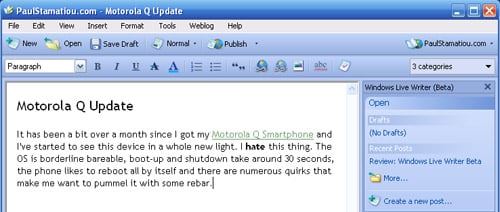
Microsoft shocked me when they recently released an interesting new blog authoring tool, Windows Live Writer (beta of course). The really interesting part is that, while geared for Windows Live Spaces users, Live Writer works with blog CMSs like WordPress, Movable Type, LiveJournal and Blogger. I have never been fond of using blogging tools and always stuck with the WordPress admin panel for two main reasons: live preview when you save a post and the ability to save drafts online instead of locally on the computer. Well ladies and gents, Windows Live Writer does, gasp, both of these things all within a Microsoft Word-like environment.
Installation
Installation is pretty much the same as with most other blogging tools; give it your site URL and login info and it automagically does the rest. It was easily able to tell I had a WordPress setup and logged in and downloaded the weblog style among other necessities. If you use Internet Explorer, there is the option of installing a toolbar that adds blogging functionality but needless to say I didn’t install that.
First Impressions
If you’ve read my blog for more than a day, you know that I’m not one quick to praise Microsoft products. I don’t know how to explain my amazement in the robustness and quality of Windows Live Writer. If I was a full-time Windows user, I could really see myself using this. It’s not some little mini-app Microsoft put out as an afterthought, this is a full-blown… blogging processor? Regardless, download a copy for yourself and follow along.
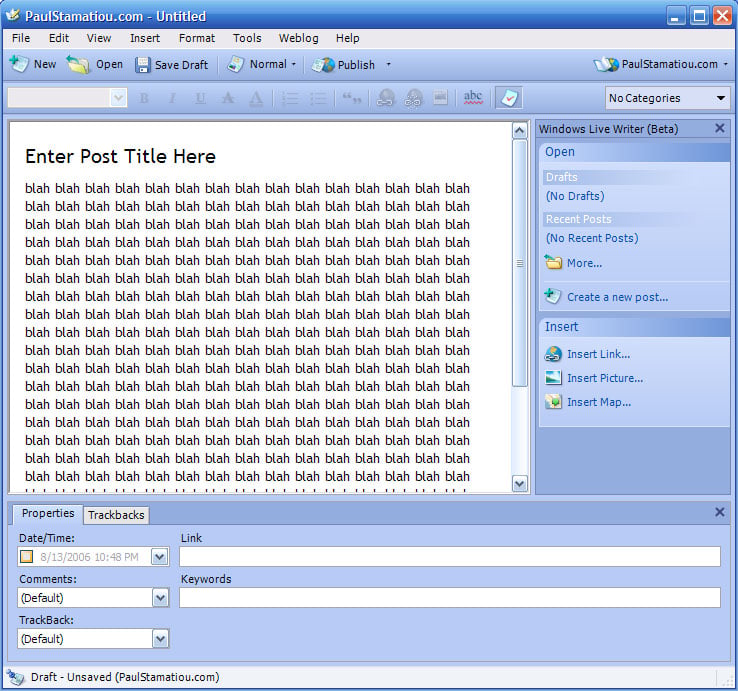
The first thing to notice about Writer is that it enables true WYSIWYG blog authoring. You can now author your post and know exactly what it will look like before you publish it. Writer knows the styles of your blog such as headings, fonts, colors, background images, paragraph spacing, margins and block quotes and enables you to edit your post using these styles.
Windows Live Writer Blog
When you fire Writer up for the first time, it will show you a new, blank post ready for your WYSIWYG tinkering right within your blog style. That is, it downloaded your CSS and recreated a virtual version of your site so you can blog within it. However, I quickly learned that it was based on Internet Explorer rendering and the title was sucked up way too high and other IE bugs that I haven’t cared to address yet. If your site looks good or somewhat decent in Internet Explorer you shouldn’t have a problem with this - otherwise you might be confined to the Normal or HTML Code views.
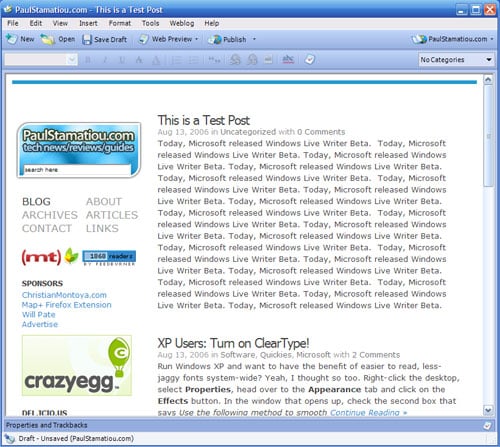
The web preview mode renders as if you were using IE, explaining the odd appearance on my site.
Features
Live Writer has the basic features you would expect of any blogging utility from WYSIWYG tools and spell check to the unique feature of inserting maps from Windows Live Local (which has this wicked cool Bird’s Eye View). With the post Properties and Trackbacks bar at the bottom you can add keywords to the post, adjust the time stamp and add URLs to send trackbacks to. On the top right of the window you can select which categories to organize the post into and Windows Live Writer was able to find out which categories my blog had.
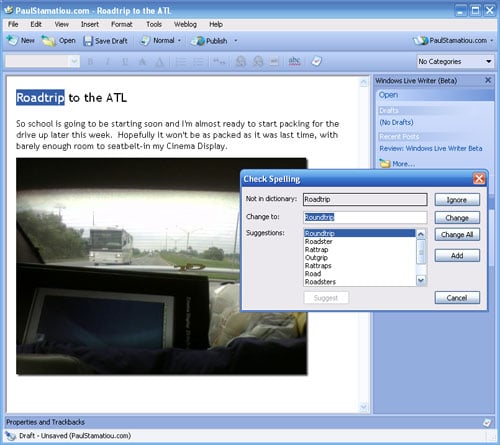
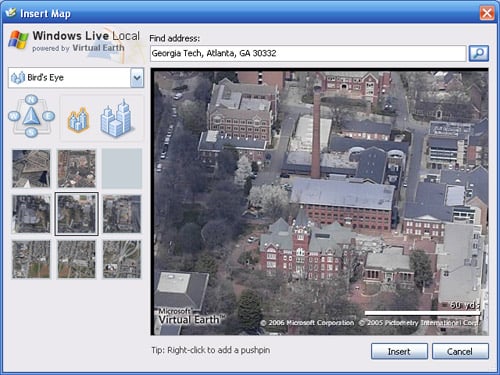
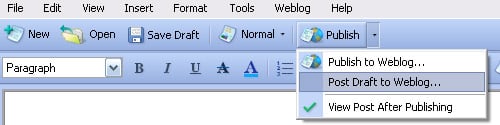
If class is almost over and you want to save that blog post about how much you hate your economics class to your server, you can click on the the drop-down arrow for the Publish button and post the draft to your blog. That way you can continue blogging from any computer and not risk losing the post if saved locally on your computer. If that’s not a big issue for you, you can switch the viewing mode to Web Preview before posting to see what it looks like on your blog - a huge plus for me.
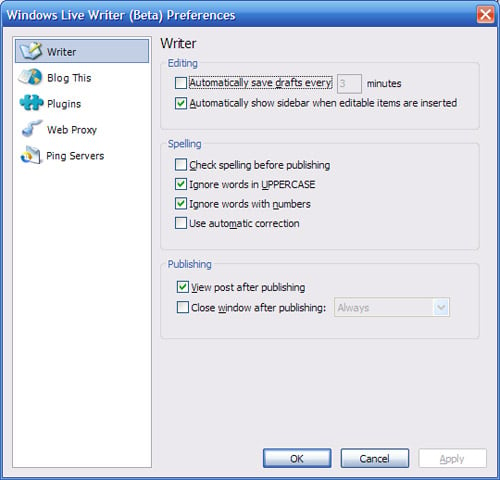
Digging into the preferences pane exposes even more features that make Windows Live Writer a viable candidate for your blogging expeditions. You can have WLW automatically save drafts at your interval of choice, automatically check spelling before publishing and ping servers you tell it to when posts are published. There is one interesting section of the preferences pane though - plugins. It links to a yet to be launched section of the Live.com site. This only leads me to believe that Microsoft will be adding functionality via plugins, similar to Firefox extensions (now called Add-ons in FF2.0+). Possible plugins might be things that help bloggers incorporate video or podcasts into their blog posts.
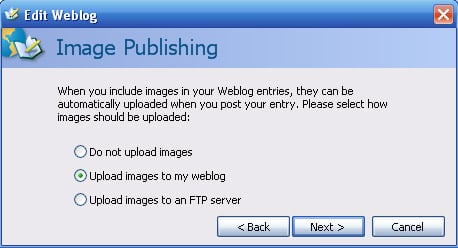
One more feature that ushers Windows Live Writer to the mainstream is photo publishing. If you include a local image in a blog post and publish it, the image will be uploaded to your server at the same time (unless you tell it to upload it via FTP to your server).
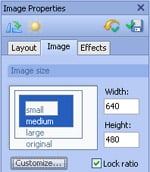
Some of those “beyond-the-norm” features of WLW include simple image editing and effects. When placing an image in a post you can easily do things like adding a drop shadow, adjusting brightness and contrast as well as sharpen, emboss and a few other image effects. While it won’t be replacing your need for Photoshop CS2, it is more than suitable for its target audience of amateur and casual bloggers that aren’t exactly losing sleep over their PPC, eCPM and page view stats.
It is Still Beta…
Don’t get your hopes up yet, there are a few flaws in Windows Live Writer.. well they are mostly annoyances. For example, the interface is not tabbed so if you want to work on two posts simultaneously you’ll be handling two separate windows. Windows Live Writer lacks the ability to grab drafts saved on your blog server rendering it somewhat crippled in the scenario where you always want to have drafts saved on your server. If you try to edit a published post and it contains <!- -more- -> which is used to add the “continue reading” dialogue, it will only show you the post up until that point; anything after it can’t be seen.
One feature I would love to see in Windows Live Writer is something like an oh shit button. Just playing around with Live Writer for this review I accidentally published random junk twice - the publish button is just in a busy place. Usually in the WordPress admin panel I have a second or two to hit the browser’s stop button, but the posting process in Writer is rather snappy. An option like a 3 second timer until posts are published would do the trick.
This brings me to my next point. There is no way to delete published posts, which would have come in handy when I accidentally published a bunch of lorem ipsum. I’m no coder, but I believe WordPress’ XML-RPC implementation (the way WLW interacts with your WordPress installation) gives it the ability to delete posts.
Overall
For an application that came out of no-where and accomplishes so much, I have to hand it to Microsoft. Microsoft, take that compliment while you can - before you can say “Let’s so double the killer delete select all,” I’ll probably be looking for employment with Apple.
Windows Live Writer has the features and capabilities of a program you would expect to see bundled in the next version of MS Office. I really think other companies can learn from this product - and they need to. Windows Live Writer can quite possibly put a company like Qumana out of business, especially when Writer is currently being offered for free. With the optional toolbar for Internet Explorer, Writer really creates a well-rounded blogging experience. However, I came to a completely different conclusion than Chris, who cited it as program built on the slow .NET platform, did.
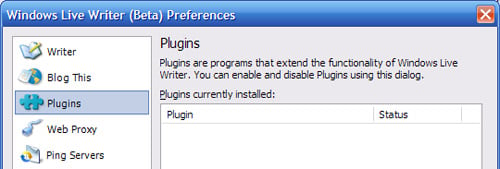
Remember how I mentioned that empty plugins page within the preferences? Microsoft has released the API and an SDK for Windows Live Writer so you can expect to see some interesting plugins very soon. Meanwhile, Mike is hooked on the fact that Microsoft is ignoring the Mac community once again whereas Dwight found a bug in WLW.
What do you think of Windows Live Writer? I’d like to see how real Windows users critique it.


Someone submitted it to digg: http://digg.com/tech_news/Windows_Live_Writer_Review_with_Many_Screenshots
I’ve been using WLW for about a day now. I’ve made a few posts myself with it and have found it to work rather well. There is one thing that I think that is missing from it, and that is the ability to add tags to posts.
One other thing that I think would be pretty good would be the ability to format a section of text using styles from your CSS file.
Other then that, I think that I’ve found myself a new way to post to my blog. :D
Windows Live Writer looks really good, but try out http://www.blogdesk.org/ it might not be as slick, but I’m not ready to jump into MS’s arms so I like alternatives.
Plus I think the image editor has a few more features, I’ll have to play with Writer more when I get home.
im an apple user now but i still appreciate good software. microsoft definantly could use some positve press these days. and even though microsoft does seemingly copy alot of apple’s work, i think apple would do good to create something similar[right now i use a 3rd party app ecto]. the problem with an apple version, is that i’d bet money their version’s features would only be 50% functional [if at all] with a non-.Mac blog.
this appears to show alot of promise though with the maps ability and plug-ins options. i wonder how much it will cost or if microsoft will integrate it with one of the standard apps like wordpad.
cool article though. dugg.
Nice review. I’ll be downloading this in just a second… Who’d have thought Microsoft would gain positive publicity from your site eh?!
That’s pretty cool, I’m gonna have to install it in my PC.
What on Earth is up with Greg Storey? He linked to this entry like this:
http://www.airbagindustries.com/archives/longboard/post_1395.php
“Typical bloatware from Redmond.”
Did he even read your entry?
Anyway, it looks good, thanks for the review. I’ll be trying it out. Thanks!
Any idea if there is a plan for a Mac version?
Nice review.
what does the cms do to the code? is it tag soup or can it produce valid xhtml?
I’ve been using Writer since yesterday.
Yesterday i’ve made a review in Portuguese (BR) in my blog.
;-)
It’s not WYSIWYG for me. I started it, told it about my Wordpress blog, watched it download all sorts of fun stuff from my web host, then edited an existing post. As soon as I got into the edit screen, this is what I saw:
http://www.kickflop.net/blog/?p=284
May have worked fine for you, but… :)
Nice blog - Will read again.
This is almost like Ecto for OS/X but with a lot less options… I think we’re going to see a flood of products like this one hitting the market sometime soon.
I tried Live Writer as well, but was left with the distinct impression that BlogDesk is still the better of the two, at least for WordPress. I don’t think BlogDesk offers the spellcheck feature, but it definitely has more options for posting images. IMHO, the primary and most critical feature that BlogDesk offers over Live Writer is the ability to set a post time in the future for a WordPress Post. This allows WordPress bloggers the ability to schedule posts.
paul,
you running this on the XP partition of the MacBook?
how is the code after its published? ive started using flock again over performancing… but i dont like its code or editor that much..
gonna give this a go.
thanks man.
@oneighturbo: I actually wrote this on my PC. My Parallels install is a little borked and I haven’t had the time to fix it yet. But I might consider using this once I fix that up.
Wow, you are still on that old voice recognition subject? Didn’t you see that there’s a second part to it whereby the voice recognition works seamlessly in Vista?
os/x
psst.
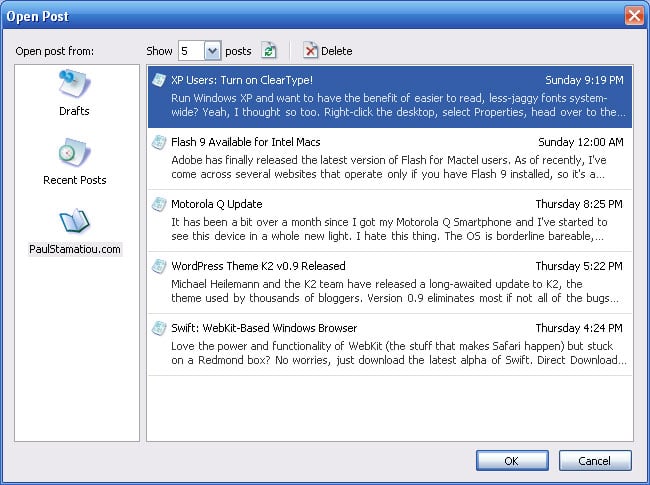
Nice review, except that you can actually delete posts from within the writer. Simply click on the “More” button in Recent posts. And then highlight your post and click on delete!
@Saurabh - thanks for the info! Although, I wish the interface for delete was a bit more intuitive. A red delete button or some easily identifiable icon would have increased usability. I bet it will make an appearance in the next update.
Haven’t had time to play with it all that much, but nice review nonetheless.
>There is no way to delete published posts
Writer does actually support deleting posts, it’s just a little unintuitive to find. If you use the Open Post dialog to find the post you want to delete, there is a button to delete the selected post. When you click that button, Writer will delete the post locally and from the server.
And thanks for the thoughtful comments. We’ll definitely take them into account for our next beta.
-Spike Washburn
(Writer Dev Team)
for two plugins: tagging and flickr, check out my blog http://timheuer.com/blog
Can anyone recommend something for the OSX folks?
Again this Microsoft… They wanna be monopolist everywhere
This looks like it was actually mostly developed by the Onfolio dev team (edit: confirmed). Onfolio *was* a really good product I had invested a lot of time (and money, and information) in. Unfortunately, they were aquired by Microsoft who immediately announced the regular program would be discontinued and features of it would be available on the Windows Live Toolbar. Of course they also announced that Firefox compatability would be discontinued as well… which enraged me since it’s really the only program of its kind and calibur that worked natively with Firefox (and IE).
So I guess this is where the rest of the gutted Onfolio ended up. I’m still bitter.
The only possibly redeeming value is the SDK which if something was developed correctly for could mean tagging and syncing tags with Wordpress plugins. My guess is though the SDK will be used more for developing IE and Windows proprietary shite for their horrible live spaces network and such. It’s a shame since the Onfolio devs were really open to talking to users/community and implementing things we wanted. Somehow that doesn’t sound like an MS trait.
Bottom line is that I’ll forever be logging into the WP interface to fix whatever ridiculous markup the blogging client sticks in there until one is made specifically for WP. Want to help? ;)
I have a lot more info, but I’ll go take up space on my blog instead, haha.
Well, it sure does look good but I don’t think they’ll ever make it available for Mac. Shall stick with Marsedit for now!
Actually I didn’t try out Live Writer, but it surely looks awsome from your point of view.
MS should consider releasing a Mac varient of the same, (since most bloggers prefer mac). However I don’t think that they have it in their minds.
Good Job. I would rate this review 10 / 10 for its simplistic language and detailed explaination
I agree it could be nail in many other Desktop Bloggers. I think Microsoft has done a good job and other desktop clients haven’t done enough to keep on top of there game.
Another killer review Paul. WLW looks awesome, I’ll give it a try soon. Thanks for the insight.
Just for clarification, the code Writer uses is not valid xhtml. It uses inline styles for the images, and adds some unrecognized attributes into the anchor tags. Writer also adds the align=”right” and align=”left” attributes for images. The alt tag for images is also non-mandatory (and a little hard to find with the interface). My suggestion would be to use the WYSIWYG to do the images and such, but then go back into the code view and clean up the mess. It’s not a big mess, but a mess nonetheless.
This sounds pretty interesting. Soon, I will be using this Windows Live Writer Beta to test out on my blog. It should be fun!
I have tried to use different desktop based weblog clients including Qumana,Flock and Blogjet. None of them worked well with wordpress.
After publishing from the editor, the post would look totally different. (Especially when using the images)
So everytime, I had to again login to wordpress admin panel and correct the layout of images etc.
Find my story here : http://www.venukb.com/blog/2006/08/17/windows-live-writer-powerful-desktop-based-weblog-client/
This is where the Web Preview/Web layout comes to rescue. This along with the Image management are the best features in Writer.
But even with writer, I am again forced to login to wordpress admin panel.
Wondering why ? Tags !! :( Hope somebody comes with a plugin soon :)
The code Writer uses is not valid xhtml, just html. But the hole Blogosphere use xhtml. Sorry, that`s so dirty.
Only one thing… it doesn’t support tagging! I mean, many blogging application supports this kind of feature. Microsoft better add that before they release the full-version.
I like it, it saves a few clicks and that’s important if you write a lot…
I use Windows Live Spaces.
The Live Writer hasn’t been much help. There’s no font-size chooser above the edit pane, and you can’t put in all font sizes. E.G: Nothing between 10 and 12 pt is admitted.
I wish it had better formatting options: Paragraph indent, line spacing, and other stuff that processors like Word allow. All of the sensible things you can put in a blog writer and still keep it light. I mean, it’s TOO Beta.
Can’t find what I want
I’ve just started using Windows Live Writer to publish to my blog, so far I’m pretty impressed.
Paul Stamatiou has the most digged Windows Live Writer blog post and it truly is a good post with lots of screenies. A few bugs have been found such as the one where a temporary posting appears as Live writer discovers what blog engine it needs to post to. I had this too when I set up menori.wordpress.com as a sand pit for testing Live Writer.
I like this wonderful piece of software. I published one of my post with this. One of the biggest thing I liked is the way it posted all the images :-)
Hey, Paul! I e-mailed you about this and I never realised that you had already reviewed it!
Whoops!
I have some comments on WLW here :
http://myworldmyaspirations.blogspot.com/2008/02/my-first-post-to-mailing-list-of-blogs.html