Twitter: putting my WordPress fanboyism aside, grats to my homie @mjmalone making a nice, yet sad [...]

Review: Motorola Q Smartphone

Jul 03, 2006 in ,

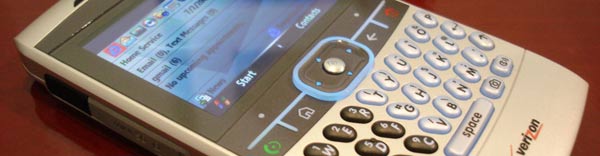
It’s about time somebody attempted to dethrone the Treo 650 and 700 from the top spot for smartphones. Motorola has recently unleashed their Q smartphone and at first glance it definitely seems like the Treo-killer. The Q’s amazing aesthetics, RAZR-thin form factor and crisp screen make it direct Treo and BlackBerry competition.
Motorola Q

Hardware

The Q excels in its hardware specs and capabilities. The 2.5 inch screen features a 320×240 resolution at 65k colors contained in a 2.5 inch wide and 0.45 inch thick housing weighing only 4 ounces. At 2.5 inches wide, the Q feels a little awkward to hold at first. As one reviewer put it, using the Q can feel like you’re talking to a piece of bathroom tile. However, the Q is much more tolerable than the brick form factor of the Treo 700. There is a mini QWERTY keyboard with adequately spaced out keys, allowing me to pump out enormous text messages in a fraction of the time it would take on a regular cell phone. Yet, the send/end keys above the keyboard feel a bit mushy, are awkwardly placed and lack sufficient tactile feedback.

Motorola Q
Motorola Q
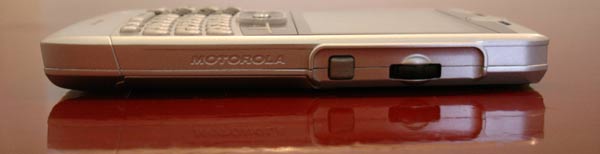
The use of a standard mini-USB connector is a welcomed sight. I can charge the Q at any computer with a standard USB to mini-USB cable.

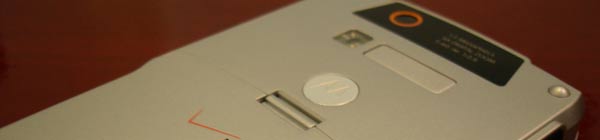
The Q is powered by a worthy 312MHz Intel Bulverde processor and comes with EVDO and Bluetooth connectivity, in addition to a surprisingly good quality 1.3 MegaPixel camera with LED flash. Unfortunately, it is not yet possible to use the phone’s EVDO capabilities as a modem for your computer. However, you can use the Bluetooth to connect to wireless headsets and keyboards. The Q lacks Wi-Fi connectivity, but Mini-SD Wi-Fi cards could be a possibility in the near future.
Motorola Q

The Motorola Q also includes a Mini-SD flash card slot which will come in handy when the on-board storage runs out, as well as an infrared port. Contrary to the Treo’s, the Q’s screen is not a touchscreen. I actually find this as an advantage as I prefer not being tethered to a stylus. The Q can easily be controlled with one hand through the use of a nifty scroll wheel found on the right side of the unit. The scroll wheel is integrated in many parts of the UI control from camera zoom to volume control.
Motorola Q

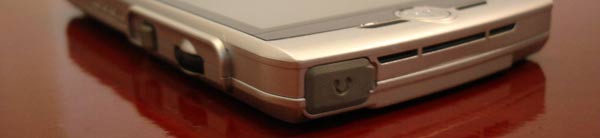
On the back of the Q, there are two speakers which deliver fairly good quality audio when using speakerphone mode or playing media. Atop of the Q there is a small mini-jack for using a headset. However, I would have liked to see Motorola use a standard size headphones jack. Sound quality in a regular telephone call is exceptionally loud and clear on the Q.

Software

Motorola decided to use Microsoft’s Windows Mobile 5.0 Smartphone OS on the Q, which is a little limited compared to Windows Pocket PC found on the Treo 700w. The software retracts from some of the usability of the Q. Some menu actions are not as you would expect them to be. If you were scrolling through your contacts list and wanted to edit a contact you first have to open the contact before you have the ability to edit the contact. But many of these things are minor annoyances - the main attraction of the Q, for me at least, is 24/7 internet connectivity.
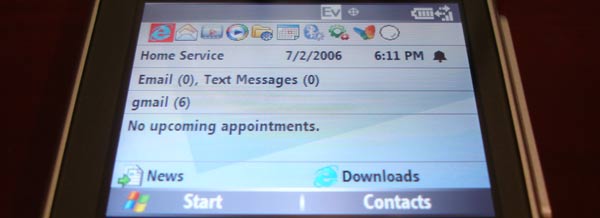
Motorola Q

With the unlimited data plan offered through Verizon Wireless (who has 6 months of Q exclusivity), the Q sports vital software to allow for an enjoyable internet experience. The mobile edition of Internet Explorer can display web pages in 3 different modes (default, desktop and one column) similar to Palm’s Blazer browser. For email checking, mobile Outlook was able to connect to my @gatech.edu (IMAP) and @gmail.com (POP3) accounts with ease. The Q can check your email up to every 15 minutes and alert you of new email. However, you can also manually send/receive emails as frequently as you like. There is also a bundled application so you can “push” email from any computer that is on and connected to the internet.
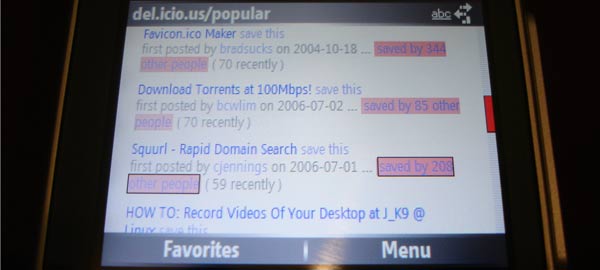
Motorola Q

I must comment on how much I love the contact list. Paired up with the scroll wheel I can quickly find any contact, whether I have 10 or 100.

Other applications include Windows Media Player, a simple Calendar, File Manager and Voice Recognition. I have always been a little skeptical of voice recognition programs but on the first try, saying “call home” actually worked and proceeded to dialing. This can become invaluable for Q users with hands-free bluetooth headsets.

Final Thoughts

At a current price point of around $200 USD, the Q is an amazing value compared to the $400 and up competitors. However, whereas the phone is reasonably priced, the service is not. The plan I chose, 450 minutes with an unlimited data plan runs $80 monthly. That is the cheapest you can get a Q with data service and that does not include text messages, although you can add some for $5 per month.

Everything else aside, the Q is a powerful platform that allows for many tweaks. A quick search on YouTube turns up many interesting results. One person was able to play emulated NES games while another pulled off an impressive Slingbox demo. The battery equipped with the Q is good for about 5 and a half continuous hours of talk time or a few hours of mucking around on the internet, which is why I opted for the extended battery as well. Despite the high monthly service fees, I find the ability to access the internet anywhere very attractive and more than worth the price. Hopefully someone will hack the Q to use it as wireless modem, instead of paying for Verizon Wireless’ proposed $15 per month add-on. What’s the point of unlimited data if you can’t use it on your laptop? All in all, Motorola provided a top-notch product with the Q and I truly think it will be as much a success as the RAZR was. Hopefully the nasty service costs won’t deter too many from this belt-worthy gadget.

Promote this article on various sites or email to your friends:     


27 Comments

  1. That is an extremely nice phone. Makes me want to give Cingular their SLVR back and tell them to shove it where it belongs.
    Again, awesome review and keep it up.

  2. Definitely a helpful review. As my current service contract comes to a close. It’s about that time to start looking for those contract deals that providers use as leverage to suck customers into a hole. That thing looks so sharp. And the thin factor…oooweee

  3. Woah, that’s a really nice phone and great review!

    Although to me, you can’t compare any phone to a Nokia, Nokias are the best!

  4. Cool review — I’d really like to have a smartphone of one variety or another some day. I was using a PDA for a while and that was nice while it lasted — but what I’m waiting for is a phone on which you’re able to sync your calendar info and contact data if it’s in a standardized format like iCal. I want to be able to sync the data to Thunderbird. All in all the Q seems awesome and I’m glad you posted your review.

  5. I was in need of a smart phone and went with the Treo. On Sprint for $50 a month I’ve got 200 minutes (I don’t use a cell much) but unlimited data and 100 SMS. I considered the Q but it wasn’t out yet when I needed it and I couldn’t find info on getting a Q without a camera as DoD classified areas don’t allow them; luckily if you request, you can get the Treo without a camera just for this reason.

    Plus I needed something that could sync with iCal and had a decent library of software which the PalmOS does; insane amounts of software with lots of cool apps to take advantage of the data plan (RSS readers, web, email, AIM). Not to mention I can go an entire day while having my Treo logged onto AIM (this allows people to get a hold of me without wasting SMS messages), make a few calls and check the news a few times at work and still have charge left in the battery for a few games of solitaire before putting it on my dresser to charge at night.

    The Q definitely got one thing right though; the price. It was a tough pill to swallow when I dropped $350 on my Treo 650.

  6. Hot damn, that is one slick phone. Like you said, if someone can manage to use this phone as a wireless modem for internet access anywhere then it would be worth the money. What are the load times and latencies with that thing? Looks good, I guess Y! is paying enough for a few new toys.

  7. great review. ive been looking into getting this phone as well but the verizon data is just so expensive. There’s a great review with a video at http://www.phonescoop.com/articles/review_moto_q/

  8. Nice review Paul. I picked up a Q two weeks ago and love it. Actually, I’m typing this from the Q right now.

  9. The data plan is still cheaper than the “all you can eat” Cingular plan. Can you give more detail about the contact list setup? For years Motorola has forced you to have duplicate “name” entries for people when listing home, work, cell, etc. Have they fixed this?

    For instance, I really like (Nokia, Treo) phonebooks where I locate the persons name, then choose from a set of numbers to dial. Most having a “main” number if I choose to just dial the name.

  10. Mike, with the Q if a contact has multiple numbers, eg home, work and mobile, it is all stored as one contact entry. I’m not sure how it determines which one is the default number but I think it might have something to do with which number you enter in first. I just added a home number to a contact and his mobile number is still the default.

  11. Usually the default number is chosen by which one you dial the most. At least that’s how it works on my RAZR.

  12. Yeah, that’s probably a good assumption.

  13. Check out PDANet http://www.junefabrics.com/pdanet/index.php to enable the Q as a modem. I’m using it with the Treo700w and Verizon’s EVDO network. I’m averaging a speedy 2.4Mbps connection.

  14. Thanks for the link John! This is exactly what I’ve been waiting for.

  15. on second thought.. PDANet is only for PCs =/

  16. I actually love this phone… I think it has not been introduced in India :-(

  17. Can you connect the moto Q by bluetooth to use as a modem. And make it so it connects by its self when it’s close the the computer??

  18. Just ordered the phone and will be getting my hands on it tomorrow when the FedEx man comes to my door. I have been a sprint customer for a few years now and many times I have not been pleased. My contract is up and I sought out other avenues. I most definitely needed a PDA/Smartphone because of my constant need to access my email (Easily I Might ADD). I work in Promotions and need to know about changes fast. I have wanted to Pocket PC for some time but that happy I can’t wait to get it for Christmas feeling quickly dies after Christmas passes and you got something else… So finally my sprint contact is up and the years of torture ending, so I looked to the nest best thing, Verizon! With this new hott phone I can walk around get my email surf the Web and look cute at the same time with my new pink silicon cover. (Hey I am a girl, we like our phones to look like they got fashionably ready too.) I am grateful for this review both positive and well put together.

    Well Beam you guys soon! -Miyanna

  19. where can i download AIM onto my Q? can someone please explain?

  20. my experience with the Q phone has not been an enjoyable one. i had been using the treo 650 which i unfortunately dropped and it kicked the bucket. i opted for the Q phone because it seemed to be a better version of the palms. However, it is NOT. it is not at all meant for business users. you can not select all delete all messages, i still can’t sync my contacts after 2 hours with technical support @ verizon and norton. my email works but now i have to delete in several places.

    if someone can help me figure this out i would really appreciate it. otherwise i’m back to the treo.

  21. Hello This is Miyanna again I had left a message about the Q when I first purchased that phone. And that phone was hell for me. Don’t get me wrong its a cute phone but my phone would completely shut off and you would not be able to turn it back on even when batt was fully charged this happened to two moto Q phones that I had. And to make matters worst the second time I went to get it fixed at the actually store here in nyc (by times square) there where people on line with the same problems!!!! So where there contract says you can only get one replacement phone they quickly allowed me to return and pick a new phone because it was obviously a default in the phone!! I current own the Pocket PC 6700 and my experience as a new verizon member and owner of a high tech phone has been a great one. All my needs are met with excellence!! I recommend this phone to anyone! And i down the Q every chance I can. If you into business get a business phone a Q is not that. Get the pocket pc 6700 our the new treo!! Hope this helps someone. Remember I left a comment earlier excited don’t listen to that!!

  22. DOES THE Q INCLUDE AIM? pls tell me somebody

  23. I downloaded AgileMobile to the Q which enables you to connect to your AIM account, even Yahoo, MSN, Google Talk and ICQ even XMPP. Pretty awesome if you ask me.

  24. I have heard many good things about this Q phone and i hope its a good phone because i just bought one off ebay last night

  1. Review: Motorola Q Smartphone…

    Nice review of the Motorola Q…….

  2. [...] Some time back I had posted about the specifications and features of the Motorola Q Phone. Now that the phone has been launched in the market, I have found a nice review of this phone and it is worth reading. The Q excels in its hardware specs and capabilities. The 2.5 inch screen features a 320×240 resolution at 65k colors contained in a 2.5 inch wide and 0.45 inch thick housing weighing only 4 ounces. At 2.5 inches wide, the Q feels a little awkward to hold at first. As one reviewer put it, using the Q can feel like you’re talking to a piece of bathroom tile. However, the Q is much more tolerable than the brick form factor of the Treo 700. There is a mini QWERTY keyboard with adequately spaced out keys, allowing me to pump out enormous text messages in a fraction of the time it would take on a regular cell phone. Yet, the send/end keys above the keyboard feel a bit mushy, are awkwardly placed and lack sufficient tactile feedback. [...]

Post a comment, receive Stammy points.


Send a trackback.


  • If you plan on posting code, run it through Postable first.
Copyright © 2005 - 2008 PaulStamatiou.com  Privacy Policy - Terms of Service Can't spell my name? Use PSTAM.com. Go back up ↑.