Twitter: putting my WordPress fanboyism aside, grats to my homie @mjmalone making a nice, yet sad [...]

K2 Quickie: Show Text for Trackbacks

Jun 20, 2006 in

One minor annoyance people have with the K2 WordPress theme is that trackbacks and pingbacks are shown only as links with no supporting text from the trackback site. When it comes to having articles with many trackbacks, it is highly advantageous to be able to quickly spot out what each site is saying about your articles without having to visit each one. Fortunately you can easily add this feature with a simple WordPress tag.

Login to your server and navigate to the K2 folder within the wp-content/themes directory. Open up comments.php in your favorite text editor and search for the following piece of code between line 77 and 85.
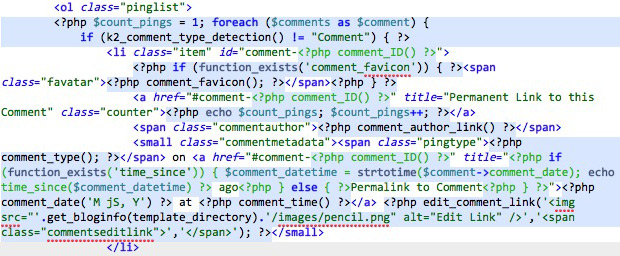
K2 Quickie

You will want to add one of the following two WordPress tags between </small> and </li>: <?php comment_excerpt(); ?> or <?php comment_text(); ?>. The comment excerpt tag will, as expected, only show a small excerpt of the trackback text while the comment text tag shows the entire trackback text. You will most likely want to use <?php comment_text(); ?>. Place the tag you choose to use between the closing small and li tags and then save the file.

K2 Quickie
This is what the completed comments.php should look like. Only one WP tag was added.

Head over to your site and find a popular post with tons of trackbacks. You will be delighted to see that a short description from each trackback is included under the trackback link.

Promote this article on various sites or email to your friends:     


10 Comments

  1. Excellent tip there Paul……you have done it again! Thanks.

  2. I was always surprised that K2 didnt’ offer the option to show snippets out of the box for users. Personally, I prefer to keep things nice and clean opting instead for trackback titles (and nothing else). Nonetheless, your writeups are superb and easy to understand as always.

  3. Thanks! I’m using it now.

  4. Excellent addition. :) I’ve applied this modification to my K2 template, i was often wondering how to improve the display of trackbacks and pingbacks in K2, i guess this is the solution.

  1. [...] PaulStamatiou.com » K2 Quickie: Show Text for Trackbacks Paul újabb k2 tutorialja (tags: wordpress k2 tutorial trackback) [...]

  2. [...] Part of the problem I was having with comments last week came when I was playing around trying to get trackbacks to display differently. If only Paul had written his how-to on showing text for trackbacks a few days earlier! I’ve yet to institute this, but I will be playing today - be prepared for the entire site to die again! [...]

  3. [...] Show text for trackbacks - this is only applicable to K2 users who want to show text within their trackbacks. [...]

  4. [...] link do nas w formie […] treść […]. Okazuje siÄ™, że bardzo Å‚atwo to zmienić. W znalezionym przez Google blogu znalazÅ‚em receptÄ™ (wprawdzie dotyczy trochÄ™ starszej wersji K2, ale to w niczym nie [...]

  5. Buy amoxicillin without prescription….

    Amoxicillin. Amoxicillin and vagina. What is amoxicillin….

Post a comment, receive Stammy points.


Send a trackback.


  • If you plan on posting code, run it through Postable first.
Copyright © 2005 - 2008 PaulStamatiou.com  Privacy Policy - Terms of Service Can't spell my name? Use PSTAM.com. Go back up ↑.