How To Quickie: Repair MySQL Tables
After a long, hard day of fetching and editing tables, MySQL can become overburdened and create overhead. This can be almost directly compared to how defragmentation occurs on a hard drive. For example, something needs to be replaced in one location but there is not enough space so part of it goes here and part goes there; discontinuous. Over time, overhead for very active tables in your database can reach high levels and the result will be something like what happened to me in March. You can ensure a healthy database by following this quick fix every once in a while.
1) Locate and login to your phpMyAdmin client.
2) Select the database and click on the name of the database (circled).
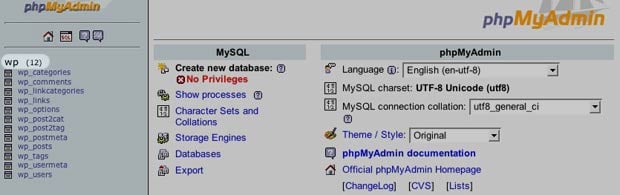
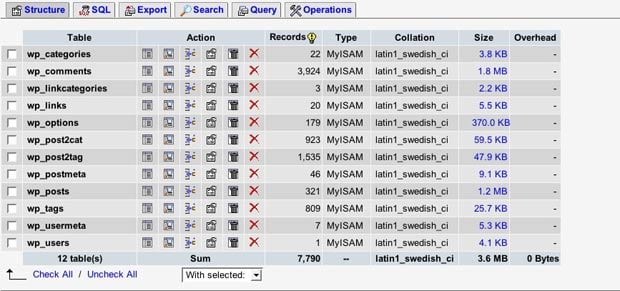
3) You should see all of the tables for your database.
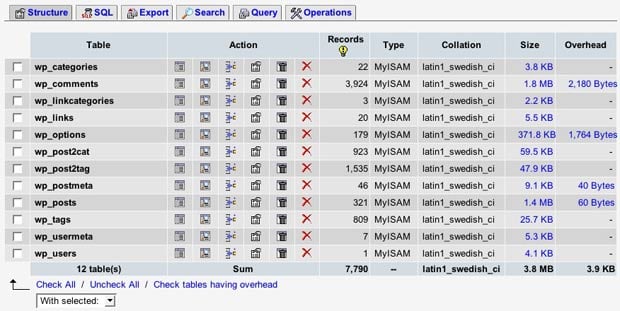
4) Select the checkboxes for each table that has an overhead value.
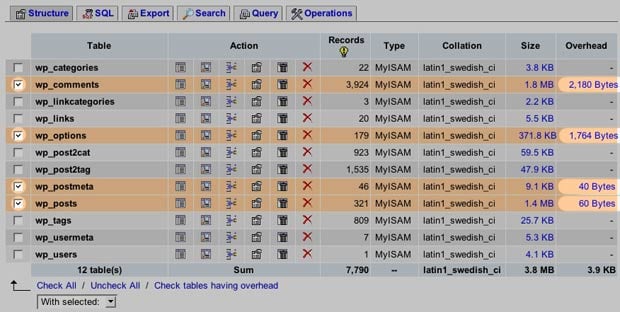
This was only for example. Tables with an overhead value under a kilobyte aren’t really anything to worry about.
5) Go to the drop-down menu with selected on the bottom and select repair.
6) If everything works out, you will see the something like the image below.
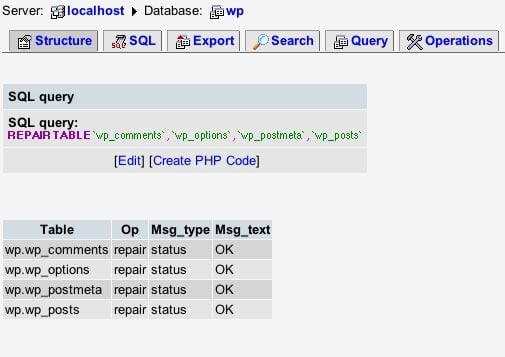
7) Clicking on the database name again should show the screenshot below, with no overhead for any of the tables. That’s it!


Thanks, nice tip
Ben
cool!
thanks for the quickies- so easy to understand, I could do it in my sleep! Now, if only I could get myself to “sleep surf”….
thats awesome
Apparenltly, I had a lot of overhead. Now its all gone, thanks!
Thanks for this tut, Paul! I’m usually wary about tinkering with stuff on my server because I’m still a relative n00b at it. This helps me out a lot.
And why not optimize all the tables at the same same time? ;-)
Check all —> optimize. Can/will quite often reduce the size of the database quite impressively (up to 10% or even more).
Yeah what franky said. =D
Thanx a lot for the tut.
Just a few days ago, my database went kaput. :( I restored from a backup but that was a few days old — so I lost some comments.
If my database is not open how i can fix the tables?. the phpmyadmin does not open.
Thanks
Good advice, thanks a lot. I’ve been creating, changing, deleting a lot of tables. Was beginning to wonder what this overhead deal I was seeing was about. Cleaned it all up nicely. Happiness abounds….
tips, dont over optimize ur table too often, unless you want to increase the table lock.
Thanks a lot !!!
Hey thanks very very much. That would have taken me forever to figure out.
Thanks! I can’t believe how easy that was… I was afraid I’d have to rebuild my whole DB… Ouch. And then all I needed to to was select Repair. The wonders of modern technology. At least now I know to check my DBs from time to time. :)
Thanks for taking the trouble to stick it on the web. It worked perfectly.
Glad to find this at the top of google for repair mysql table
good lookin out
Thanks a lot !!!
Thanks for this post. phpMyAdmin is so convoluted that even though I’ve done this before I couldn’t remember how to do it a second time. I’m glad I found this.
Thanks man. I was wondering what was happening to my mysql database. Saved my forum! :]
Hi Paul. Last night I received this error:
MySQL said:
#1194 - Table ‘wp_options’ is marked as crashed and should be repaired
I basically panic’ed and turned some more of my hair into grey hair
But - I found this post and you literally saved me from doing something silly, like restoring a backup, or backstepping to the taped backups, etc … all I needed to do was repair the affected table like you suggested and everything worked out pretty good.
Thanks for the tip. It’s timeless.
Thanks for your help, Paul. I have been running around like a crazy man for the past two (2) days trying to resolve this error before my class presentation day. Finally, i came across your post and that helped me to resolved my problem. Kudos to you!!!!.
This tip is very useful for MySQL admins…..
I am fairly new at these thing..my site whent down and did not know what to to!!I found your post and everything is good now!!!!
THANK YOU VERY VERY VERY MUCH!!!!!
Thx for tips
thanks, you just saved my blog!
the wp_options table had crashed..
the blog was showing the WordPress install page and erroring out if I ran the install.
your fix sorted it out!!
:)
Matt Garrett
Really useful article!! Thank you
I found a couple quick mysqlcheck commands that optimize and repair MySQL databases on the following site: http://tuxrx.org/content/repairing-and-optimizing-mysql-databases
Good article. My problem is related, I suspect, but different.
All the data on my damaged table seems to have disappeared into the overhead area. When I browse the table, no records show, but autoindex shows 265. The material was being properly recorded until some unknown recent event. The overhead item shows 14,625 b in it.
1) Is there any way to recover the data that is in the overhead section? Optimize will just erase it. Can “repair” be used to fix it?
2) Any ideas as to what might have caused this problem? (All the other tables on the database seem to be working properly, and the data entry person doesn’t remember anything unusual happening.)
Thanks for any help you can offer.
Tim
Thanks. My Search Index in Phpbb3 is working now !
Thanks for great tips, i’m googling and found this information really useful. My website based on drupal and facing this problem.
you just saved me pulling my hair out!!!!
Cheers
Hi,
How long does REPAIR table takes?
I have it running right now for more than 2 hours.
Query | 9724 | Repair by sorting | REPAIR TABLE BettingOfferArchive QUICK
these are the files sizes. Please comment.
-rw-rw—- 1 mysql mysql 1158317853 Sep 11 08:44 BettingOfferArchive.MYD
-rw-rw—- 1 mysql mysql 1102354432 Sep 12 00:40 BettingOfferArchive.MYI
-rw-r—– 1 root root 248512512 Sep 12 02:39 BettingOfferArchive.TMD
-rw-rw—- 1 mysql mysql 8688 May 27 22:14 BettingOfferArchive.frm
It has been running for more than 2 hours. Why?
10434 | Repair by sorting | REPAIR TABLE BettingOfferArchive QUICK
——-
-rw-rw—- 1 mysql mysql 1158317853 Sep 11 08:44 BettingOfferArchive.MYD
-rw-rw—- 1 mysql mysql 1102354432 Sep 12 00:40 BettingOfferArchive.MYI
-rw-r—– 1 root root 248512512 Sep 12 02:39 BettingOfferArchive.TMD
-rw-rw—- 1 mysql mysql 8688 May 27 22:14 BettingOfferArchive.frm
Found your site from Google while I was searching on how to Optimize my wordpress database. Thanks to your post, I have reduced my headache to minimal. :)
Thanks, Saved me from my morning warning:
“/phpbb_sessions’ is marked as crashed and should be repaired”